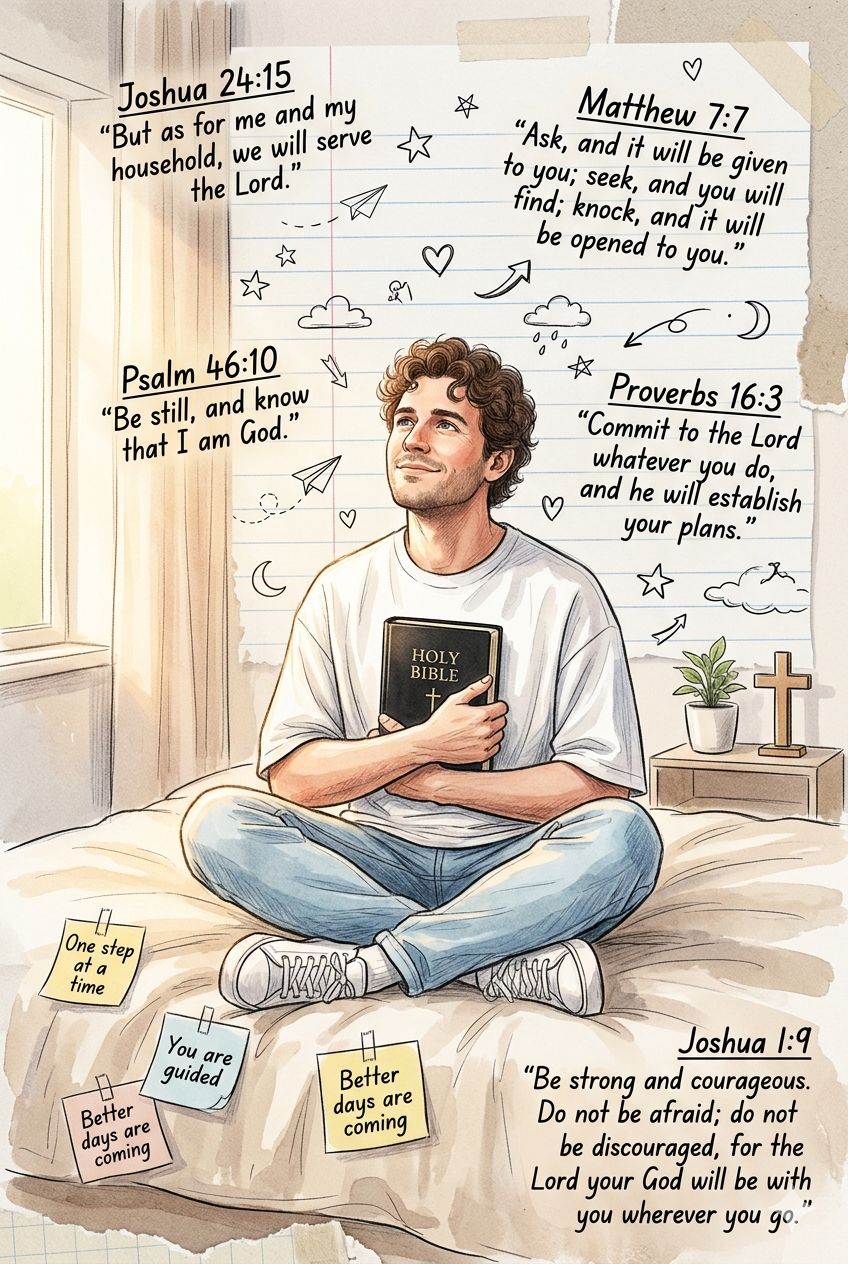
Christian aesthetic portrait

Advertisement
Christian aesthetic portrait  - AI Generated Image
AI Prompt Used

Create a dreamy, hyper-realistic watercolor + sketchbook-style Christian aesthetic portrait using the exact same male character from the uploaded reference image. Preserve strict facial identity consistency — identical face shape, hairstyle, skin tone, expression, and natural features. Scene: The man is sitting cross-legged on a soft beige bed inside a warm minimalist bedroom, holding and reading a black HOLY BIBLE close to his chest while looking slightly upward with a peaceful, hopeful expression. Outfit: oversized white t-shirt, light blue jeans, white sneakers. Warm morning sunlight enters softly from the side, creating cozy highlights and gentle shadows. Art style: soft watercolor wash blended with hand-drawn notebook doodles, paper texture, vintage journal aesthetic, subtle torn paper collage effect, handwritten typography, warm cream and beige tones, delicate sketch outlines, inspirational mood. Background details: * Notebook paper texture covering the wall * Small hand-drawn stars, hearts, sparkles, clouds, arrows, paper airplanes, moon doodles * Sticky notes attached to bed sheets * Minimal bedside table with small plant and wooden cross * Floating decorative scripture illustrations around the subject Add these inscriptions exactly as handwritten text: Top Left: Joshua 24:15 “But as for me and my household, we will serve the Lord.” Top Right: Matthew 7:7 “Ask, and it will be given to you; seek, and you will find; knock, and it will be opened to you.” Middle Left: Psalm 46:10 “Be still, and know that I am God.” Middle Right: Proverbs 16:3 “Commit to the Lord whatever you do, and he will establish your plans.” Bottom Right: Joshua 1:9 “Be strong and courageous. Do not be afraid; do not be discouraged, for the Lord your God will be with you wherever you go.” Sticky Notes: * One step at a time  * You are guided  * Better days are coming  Composition: centered portrait, relaxed pose, inspirational Christian devotional atmosphere, ultra detailed, cinematic lighting, 2:3 vertical ratio, high detail, clean typography integration.
Advertisement

Discover Superior Results With The Help Following Ai Option

Midjourney has solidified its position as the premier AI art platform for creators seeking to transform imaginative concepts into stunning visual masterpieces. Whether you want stunning visual artwork, creative compositions, or unique artistic styles, Midjourney's innovative prompts enable you to control style, composition, color palette, and artistic elements with AI-powered precision. This curated collection of prompts is tailored for artists, designers, and creative professionals who want more than just basic AI generation; it's for those eager to experiment with artistic styles, build portfolios, and create unique visual content using Midjourney's advanced capabilities. Each prompt combines trending aesthetics like christian, aesthetic, portrait, from innovative artistic movements to classic techniques reimagined for the digital age. With Midjourney's advanced artistic engine, even simple concepts can become gallery-worthy artworks that showcase creativity, style, and technical excellence.

How To Edit Your Photo Using This Prompt

1
Access the Platform: Access the Midjourney platform through Discord or the web interface. Join a dedicated channel or use direct messaging with the Midjourney bot.
2
Prepare Your Input: Start with a clear concept or reference image. Consider the artistic style, composition, and mood you want to achieve.
3
Use Your Prompt: Type "/imagine" followed by your chosen prompt. For example: "Create a dreamy, hyper-realistic watercolor + sketchbook-style Christian aesthetic portrait using th". Adjust parameters like --ar for aspect ratio or --style for different artistic approaches.
4
Customize Details: Specify artistic style, color palette, composition rules, and mood. Include references to specific artists or art movements if desired.
5
Generate and Refine: Click generate and wait for the initial results. Use the U buttons to upscale specific variations or V buttons to create new variations based on your favorites.
6
Finalize and Export: Download your preferred result in your chosen resolution. Use Max Upscale for the highest quality output suitable for professional use.

Expert Tips for Best Results

  • Be Specific About Style: Mention artistic movements, specific artists, or detailed style descriptions for consistent results.
  • Control Composition: Use terms like 'rule of thirds', 'leading lines', or 'symmetrical composition' for better layout control.
  • Specify Color Palette: Include specific color combinations, mood-based palettes, or seasonal color themes.
  • Iterate and Refine: Don't hesitate to generate multiple variations and build upon successful results.
  • Use Negative Prompts: Exclude elements you don't want to see in the final artwork.
  • Experiment with Parameters: Adjust style, chaos, and quality parameters to explore different creative directions.
  • Combine Techniques: Mix different artistic styles and techniques for unique hybrid creations.

Recommended AI Tools

Midjourney

Excellent for artistic and creative imagery with strong stylistic control

DALL-E 3

Great for conceptual art and understanding complex prompt requirements

Stable Diffusion

Ideal for custom models and local generation with extensive control

Adobe Firefly

Perfect for commercial use with ethical training data

Usage Tips

  • Experiment with different art styles and mediums mentioned in the prompt
  • Adjust the --ar parameter for different aspect ratios in Midjourney
  • Use style references for more consistent results
  • Try varying the chaos parameter for more creative variations
  • Combine with other artistic prompts for hybrid styles

Optimization Tips

  • Use specific, descriptive language in your prompts for better AI understanding
  • Include relevant keywords like 'christian', 'aesthetic' for targeted results
  • Experiment with different parameter combinations to optimize outputs
  • Save successful prompt variations for future reference and refinement
  • Stay updated with the latest AI model capabilities and limitations
Advertisement

You Might Like:

Quick Unique Best Match
Loading ai editing prompt...