Viral Cockroach Janata Party Photo Editing Prompt

Advertisement
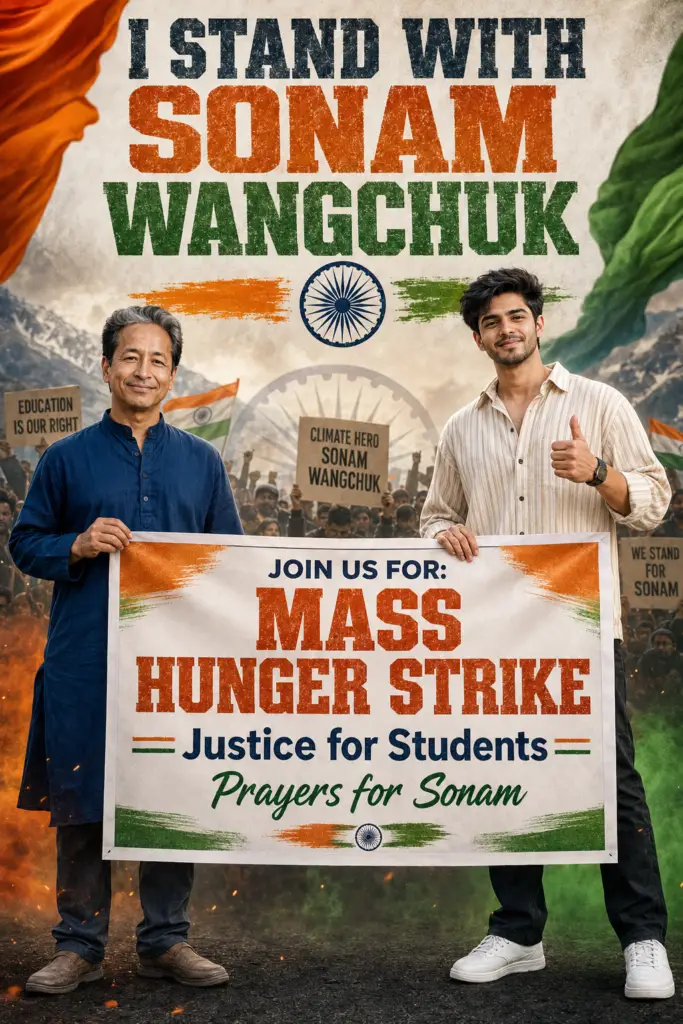
Viral Cockroach Janata Party Photo Editing Prompt - AI Generated Image
AI Prompt Used

Create a premium ultra-realistic 2:3 vertical protest poster featuring Sonam Wangchuk standing confidently on the left wearing a navy blue kurta and smiling calmly. On the right, a young Indian man with a handsome natural face, neatly styled short black hair, light stubble, medium wheatish skin tone, wearing a cream striped oversized shirt, black pants, and clean white sneakers, gives a thumbs-up while smiling confidently at the camera. Both are holding a large protest banner together. At the top, add bold distressed typography reading: "I STAND WITH SONAM WANGCHUK" in large uppercase letters. Use an Indian tricolor (saffron, white, and green) themed background with a textured patriotic design. Place the Ashoka Chakra below the title with saffron and green brush strokes extending horizontally. The protest banner should be white with Indian tricolor accents and contain bold, clean typography: JOIN US FOR: MASS HUNGER STRIKE Justice for Students Prayers for Sonam Include silhouettes of peaceful protesters holding placards in the background with a subtle faded Ashoka Chakra behind them. Add realistic Indian flag textures, patriotic smoke effects, cinematic volumetric lighting, premium HDR color grading, realistic skin textures, ultra-sharp focus, vibrant colors, high contrast, ultra-detailed 8K quality, professional political campaign poster design, clean composition, inspirational patriotic atmosphere, modern social media poster aesthetic, realistic shadows, premium depth of field, magazine-quality finishing. Negative Prompt: Blurry, low resolution, distorted faces, extra fingers, bad anatomy, cropped body, duplicated people, text glitches, watermark, logo, oversaturated colors, unrealistic lighting, low-quality rendering, artifacts, deformed hands, cartoon style, CGI look, plastic skin, noisy image, motion blur, poor typography, incorrect flag colors.
Advertisement

Discover Superior Results With The Help Following Ai Option

Leonardo AI has become the favorite among professional artists and designers for its studio-quality outputs and advanced features. Whether you want professional-grade photography, realistic portraits, or cinematic scenes, Leonardo AI's innovative prompts enable you to control lighting, composition, camera settings, and mood with AI-powered precision. This curated collection of prompts is tailored for photographers, content creators, and visual storytellers who want more than just basic AI generation; it's for those eager to enhance photographic skills, create professional portfolios, and produce stunning visual content using Leonardo AI's advanced capabilities. Every prompt incorporates current visual trends including viral, cockroach, janata, blending professional photography principles with AI-enhanced creativity. Using Leonardo AI's professional-grade tools, standard concepts can become studio-quality productions that exhibit commercial-ready polish and artistic integrity.

How To Edit Your Photo Using This Prompt

1
Access the Platform: Access Leonardo AI through their web platform or integrated design tools designed for professional creative workflows.
2
Prepare Your Input: Upload your photo on respective AI . Ensure you have specific lighting, composition, and style requirements in mind.
3
Use Your Prompt: Input your prompt in the generation panel. Use: "Create a premium ultra-realistic 2:3 vertical protest poster featuring Sonam Wangchuk standing confi". Select appropriate models and adjust generation parameters as needed.
4
Customize Details: Define camera settings, lighting conditions, focal length, and photographic style. Mention specific techniques or equipment if relevant.
5
Generate and Refine: Launch the generation and track progress. Use the platform's advanced tools to make real-time adjustments and refinements.
6
Finalize and Export: Export your final creation in professional formats. The platform offers commercial-grade outputs ready for various applications.

Expert Tips for Best Results

  • Define Lighting Conditions: Specify 'golden hour', 'studio lighting', 'natural light', or 'dramatic shadows' for mood control.
  • Mention Camera Equipment: Reference specific cameras, lenses, or photographic equipment for authentic results.
  • Set the Scene: Describe backgrounds, environments, and atmospheric conditions in detail.
  • Control Depth of Field: Use terms like 'shallow depth of field', 'bokeh background', or 'everything in focus'.
  • Specify Photo Style: Mention 'portrait photography', 'landscape', 'street photography', or 'commercial shoot'.
  • Include Technical Details: Reference ISO, aperture, shutter speed, or film types for realistic rendering.
  • Consider Post-Processing: Mention desired editing styles like 'vintage filter', 'high contrast', or 'natural colors'.

Recommended AI Tools

ChatGPT

Superior at understanding photographic terms and realistic rendering

Google Gemini

Strong research capabilities and factual accuracy

Stable Diffusion

Best for photorealistic outputs with custom models

Midjourney

Excellent for artistic photography styles and compositions

Usage Tips

  • Specify camera types and lenses for different photographic effects
  • Use lighting terms like 'golden hour' or 'studio lighting'
  • Experiment with different film types and processing styles
  • Add compositional rules like 'rule of thirds' explicitly
  • Include depth of field requirements for focus control

Optimization Tips

  • Use specific, descriptive language in your prompts for better AI understanding
  • Include relevant keywords like 'viral', 'cockroach' for targeted results
  • Experiment with different parameter combinations to optimize outputs
  • Save successful prompt variations for future reference and refinement
  • Stay updated with the latest AI model capabilities and limitations
Advertisement

You Might Like:

Quick Unique Best Match
Loading ai editing prompt...