15 August Ai Video Editing Tools And Prompt

Advertisement
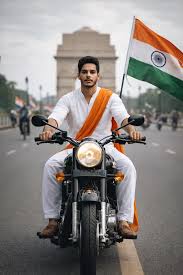
15 August Ai Video Editing Tools And Prompt  - AI Generated Image
AI Prompt Used

Use the uploaded photo as the ONLY identity reference. IDENTITY PRESERVATION IS THE HIGHEST PRIORITY. Create one ultra-realistic vertical 9:16 cinematic 10-second patriotic motorcycle video. The subject must remain the EXACT SAME real person from the uploaded photo in every frame. Preserve the exact face shape, eyes, eyebrows, nose, lips, jawline, ears, skin tone, hairstyle, hairline, natural age, height, shoulder width, body shape, arm length and leg length. DO NOT regenerate the face after scene cuts. DO NOT create a similar-looking person. Use one permanently locked facial identity and one permanently locked body throughout the entire video. Keep natural facial asymmetry, skin texture and hairstyle exactly as in the uploaded photo. No beautification, smoothing, age change, body slimming or muscle enlargement. NO helmet, NO visor, NO mask. The real face and hairstyle must remain visible. Keep one identical outfit throughout: black premium riding jacket with neon-yellow details, black trousers, neon-yellow gloves and light sneakers. Keep one identical black naked street motorcycle with orange-gold front forks. Keep the same empty urban road, yellow-black divider, black-white barriers, green trees and soft grey overcast sky throughout. Keep one correct Indian national flag with saffron, white, green and navy-blue Ashoka Chakra. SCENE 1: Front three-quarter full-body shot. The person stands holding the Indian flag. Keep the face large, sharp and identical to the uploaded photo. Very slow camera push-in. SCENE 2: Same face angle. The person gives a respectful salute. Only the arm moves; keep the head almost completely still. SCENE 3: The person stands beside the motorcycle with one hand near the handlebar. Face remains front three-quarter and clearly visible. SCENE 4: Slow motorcycle riding shot. Use a gentle side-front tracking camera. Keep the head stable and face clearly visible. Indian flag waves behind. SCENE 5: Continue the slow ride. No salute while moving. Keep both hands naturally controlling the motorcycle to prevent body and face distortion. Maintain the exact same face. SCENE 6: The motorcycle stops. Final medium hero shot beside the bike. The person looks directly toward the camera and gives a respectful salute. Hold this final face clearly for at least one second. Use low subject motion, smooth camera movement, realistic flag physics and premium muted cinematic colour grading. FACE SAFETY RULES: No fast head turns. No extreme side profile. No rear-to-front facial transformation. No camera orbit. No face motion blur. No fast zoom. No facial expression changes that reshape the face. No face enhancement. Keep “aiediting007” fixed in the lower-right corner throughout the video in small premium white text. NEGATIVE: no face change, no identity drift, no face morphing, no face swap, no reconstructed face, no different eyes, no different nose, no different lips, no different jawline, no hairstyle change, no age change, no height change, no body change, no outfit change, no bike change, no helmet, no extra people, no duplicate person, no broken hands, no cartoon, no CGI skin.
Advertisement

Discover Superior Results With The Help Following Ai Option

Google Gemini AI has emerged as the go-to solution for transforming everyday content into visually striking digital masterpieces. Whether you want high-quality outputs, creative solutions, or professional results, Google Gemini AI's innovative prompts enable you to control every aspect of your creative vision with precision with AI-powered precision. This curated collection of prompts is tailored for undefined who want more than just basic AI generation; it's for those eager to undefined using Gemini AI's advanced capabilities. Every prompt features cutting-edge approaches like august, video, editing, making it easy to consistently produce high-quality, trend-aware content. With Gemini AI's powerful generation engine, straightforward inputs can become professional-quality outputs that reflect precision, style, and modern aesthetics.

How To Edit Your Photo Using This Prompt

1
Access the Platform: Access Google Gemini AI through the browser interface, mobile application, or integrated Google Workspace tools.
2
Prepare Your Input: undefined
3
Use Your Prompt: Input your prompt directly into the generation interface. Try: "Use the uploaded photo as the ONLY identity reference. IDENTITY PRESERVATION IS THE HIGHEST PRIOR". Use descriptive language and be specific about your desired outcome.
4
Customize Details: undefined
5
Generate and Refine: Initiate generation and monitor the progress. The platform will provide multiple options that you can refine or regenerate as needed.
6
Finalize and Export: Choose the best result and export in your desired format and resolution. The platform provides options for different applications and platforms.

Expert Tips for Best Results

  • Be Descriptive: Use specific, detailed language rather than vague or abstract terms.
  • Provide Context: Include the purpose, audience, and intended use of the generated content.
  • Use Examples: Reference similar works, styles, or outcomes you're trying to achieve.
  • Iterate Systematically: Make small, specific changes between generations to understand what works.
  • Balance Specificity and Flexibility: Be specific about what matters most, but allow creative freedom elsewhere.
  • Learn Platform Nuances: Understand the specific strengths and limitations of your chosen AI platform.
  • Document Successful Prompts: Keep a record of what works well for future reference and consistency.

Recommended AI Tools

ChatGPT

Versatile all-around AI assistant for various tasks

Midjourney

Leading AI image generation platform

DALL-E 3

Advanced image generation with strong prompt understanding

Claude

Excellent for complex reasoning and content creation

Usage Tips

  • Be specific and detailed in your modifications
  • Test the prompt across different AI platforms
  • Keep a log of successful variations and parameters
  • Understand the limitations of each AI model
  • Iterate and refine based on initial results

Optimization Tips

  • Use specific, descriptive language in your prompts for better AI understanding
  • Include relevant keywords like 'august', 'video' for targeted results
  • Experiment with different parameter combinations to optimize outputs
  • Save successful prompt variations for future reference and refinement
  • Stay updated with the latest AI model capabilities and limitations
Advertisement

You Might Like:

Quick Unique Best Match
Loading ai editing prompt...