Motu Patlu Ai Prompt For Photos and Video Creation

Advertisement
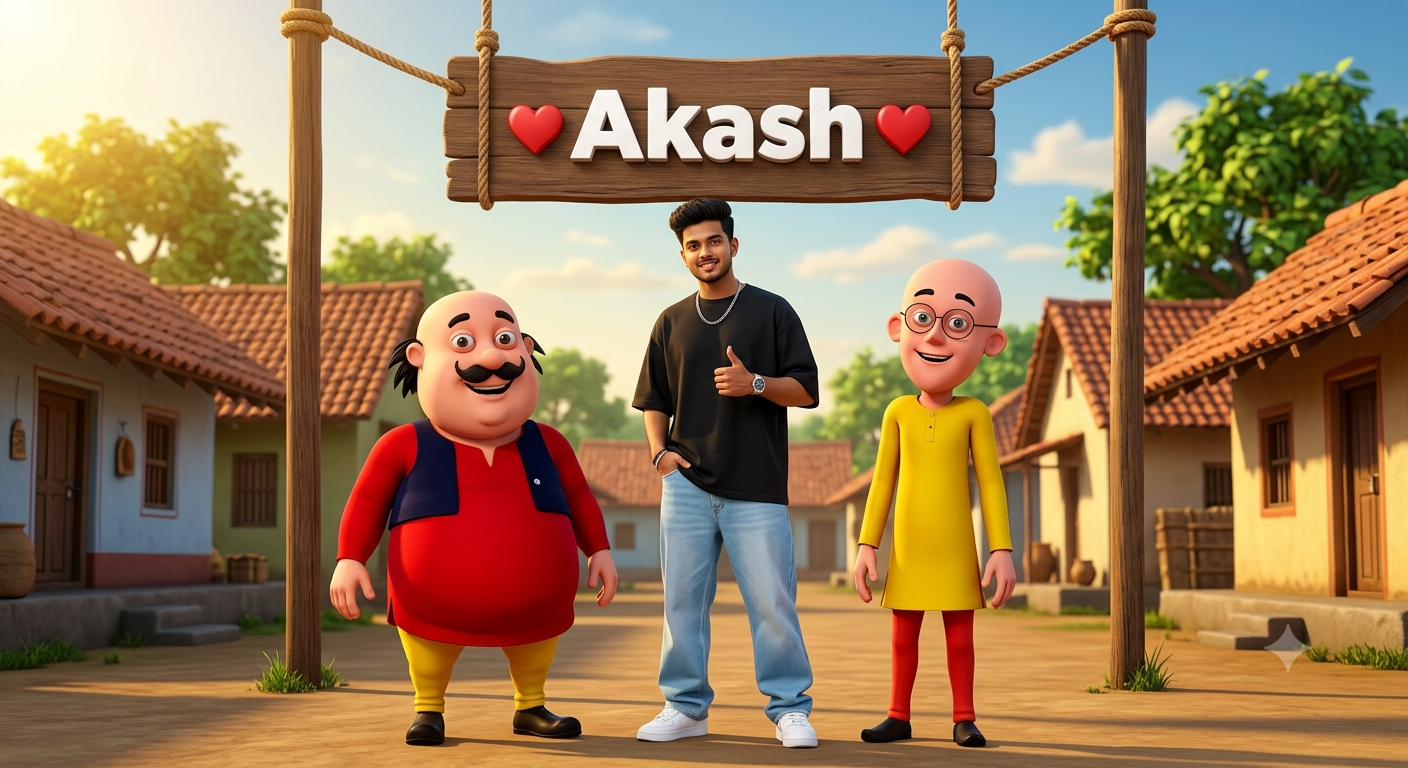
Motu Patlu Ai Prompt For Photos and Video Creation - AI Generated Image
AI Prompt Used

Create a high-quality 3D cartoon-style scene inspired by classic Indian animation. Two funny cartoon friends stand under a rustic wooden hanging signboard in the middle of a beautiful Indian village street. The left character is a chubby man with a big black moustache, wearing a red kurta, yellow pajama, dark blue waistcoat, and black shoes. The right character is a slim bald man with round glasses, wearing a yellow kurta, red pants, and black shoes. Both are smiling happily and facing the camera.Add a realistic young Indian man standing naturally between the two cartoon characters.IMPORTANT: Use the uploaded reference image ONLY for the human face. Preserve the face with an exact identity match, including facial structure, hairstyle, skin tone, beard (if any), eyes, nose, lips, and expression. Do not stylize or alter the face.The person is wearing a premium oversized black T-shirt, light blue baggy jeans, white sneakers, a stylish wristwatch, and a silver chain. The pose is relaxed and confident, with one hand in the pocket and the other giving a thumbs-up. Match the lighting, shadows, perspective, and scale naturally so the human blends perfectly with the 3D cartoon environment.The wooden signboard is suspended with thick ropes between two wooden poles. On the signboard, display the text:❤️ [Akash] ❤️Replace only [YOUR NAME] with any custom name while keeping the same bold white 3D font, centered alignment, red heart icons on both sides, identical size, spacing, perspective, lighting, shadows, and wooden texture.Background: traditional Indian village with tiled-roof houses on both sides, green trees, blue sky with soft clouds, warm golden sunlight, cinematic composition, vibrant colors, ultra-detailed textures, realistic lighting, shallow depth of field, 8K, HDR, Pixar-quality 3D render.
Advertisement

Discover Superior Results With The Help Following Ai Option

ChatGPT has become the industry standard for prompt understanding and realistic image generation with exceptional attention to detail. Whether you want professional-grade photography, realistic portraits, or cinematic scenes, ChatGPT's innovative prompts enable you to control lighting, composition, camera settings, and mood with AI-powered precision. This curated collection of prompts is tailored for photographers, content creators, and visual storytellers who want more than just basic AI generation; it's for those eager to enhance photographic skills, create professional portfolios, and produce stunning visual content using DALL-E 3's advanced capabilities. Every prompt incorporates current visual trends including motu, patlu, prompt, blending professional photography principles with AI-enhanced creativity. Using DALL-E 3's sophisticated understanding capabilities, basic descriptions transform into photorealistic images that demonstrate exceptional detail and coherence.

How To Edit Your Photo Using This Prompt

1
Access the Platform: Open ChatGPT with DALL-E integration or access DALL-E directly through the OpenAI platform. Use the web interface or mobile application.
2
Prepare Your Input: Upload your photo on respective AI . Ensure you have specific lighting, composition, and style requirements in mind.
3
Use Your Prompt: Enter your prompt in the generation field. Use: "Create a high-quality 3D cartoon-style scene inspired by classic Indian animation. Two funny cartoon". Specify style, quality, and any specific requirements in natural language.
4
Customize Details: Define camera settings, lighting conditions, focal length, and photographic style. Mention specific techniques or equipment if relevant.
5
Generate and Refine: Click the generate button and review the created images. You can request variations or make specific edits to the generated content.
6
Finalize and Export: Select your preferred output and download in high resolution. The platform offers different quality settings for various use cases.

Expert Tips for Best Results

  • Define Lighting Conditions: Specify 'golden hour', 'studio lighting', 'natural light', or 'dramatic shadows' for mood control.
  • Mention Camera Equipment: Reference specific cameras, lenses, or photographic equipment for authentic results.
  • Set the Scene: Describe backgrounds, environments, and atmospheric conditions in detail.
  • Control Depth of Field: Use terms like 'shallow depth of field', 'bokeh background', or 'everything in focus'.
  • Specify Photo Style: Mention 'portrait photography', 'landscape', 'street photography', or 'commercial shoot'.
  • Include Technical Details: Reference ISO, aperture, shutter speed, or film types for realistic rendering.
  • Consider Post-Processing: Mention desired editing styles like 'vintage filter', 'high contrast', or 'natural colors'.

Recommended AI Tools

ChatGPT

Superior at understanding photographic terms and realistic rendering

Google Gemini

Strong research capabilities and factual accuracy

Stable Diffusion

Best for photorealistic outputs with custom models

Midjourney

Excellent for artistic photography styles and compositions

Usage Tips

  • Specify camera types and lenses for different photographic effects
  • Use lighting terms like 'golden hour' or 'studio lighting'
  • Experiment with different film types and processing styles
  • Add compositional rules like 'rule of thirds' explicitly
  • Include depth of field requirements for focus control

Optimization Tips

  • Use specific, descriptive language in your prompts for better AI understanding
  • Include relevant keywords like 'motu', 'patlu' for targeted results
  • Experiment with different parameter combinations to optimize outputs
  • Save successful prompt variations for future reference and refinement
  • Stay updated with the latest AI model capabilities and limitations
Advertisement

You Might Like:

Quick Unique Best Match
Loading ai editing prompt...