Prompt Seen: AI Miniature Diorama Portrait Generator - Create Viral Photo Editing Prompts

Advertisement
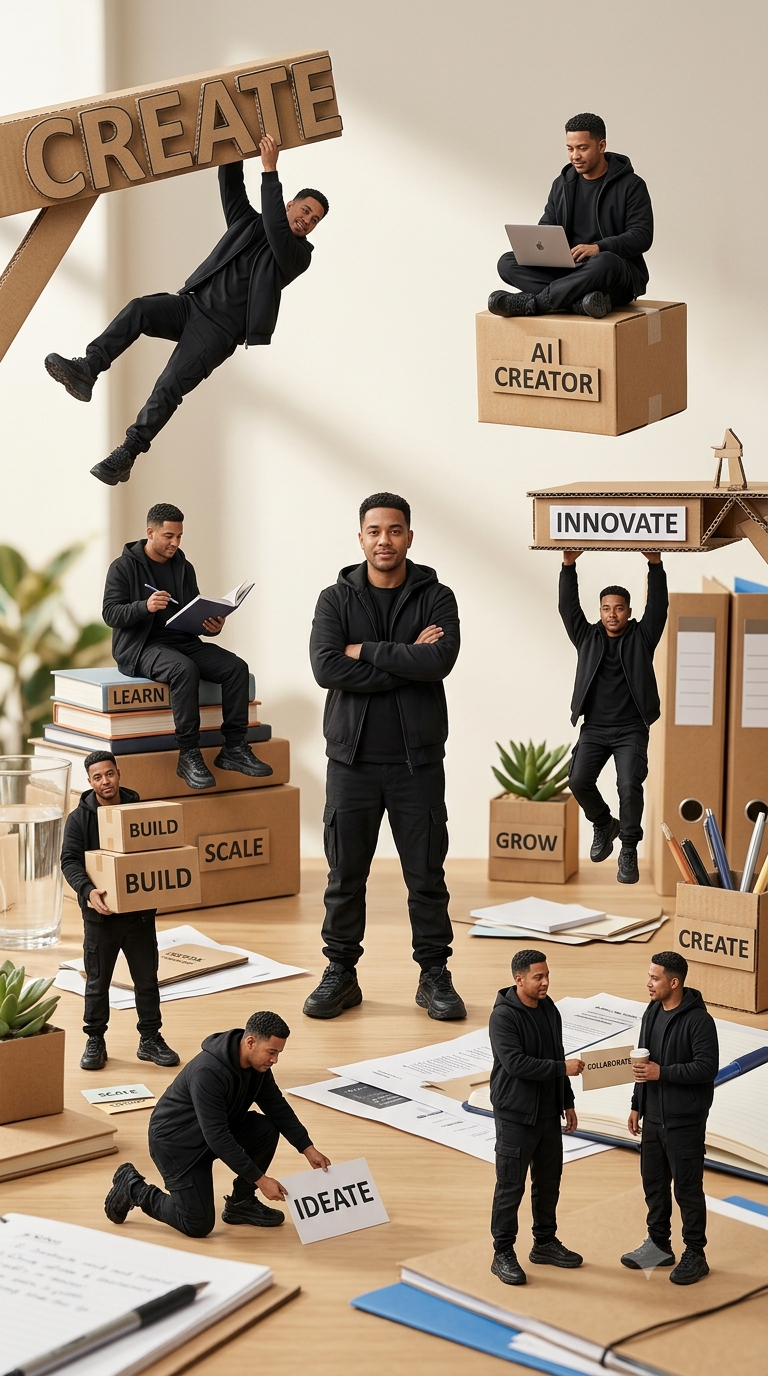
Prompt Seen: AI Miniature Diorama Portrait Generator - Create Viral Photo Editing Prompts - AI Generated Image
AI Prompt Used

Use the uploaded photo as the facial identity reference Use the uploaded photo as the facial identity reference. Preserve the subject’s recognizable facial features, skin tone, hairstyle, facial proportions, and overall appearance consistently across every miniature version. Create a premium photorealistic miniature-diorama portrait featuring the same adult man appearing multiple times as tiny handcrafted figures across a large creative workspace. Give every miniature the same face and outfit for strong character consistency. Dress him in a modern all-black creator outfit: black hooded jacket, black T-shirt, black cargo trousers, and chunky black sneakers. Keep the styling clean, minimal, and contemporary. Show approximately 8 miniature versions of the same man performing different creative and entrepreneurial activities around a wooden desk: One miniature hanging playfully from a large cardboard structure labeled “CREATE” One sitting cross-legged on a floating cardboard box, working on a small laptop labeled “AI CREATOR” One seated on stacked books holding a pen, with a book labeled “LEARN” One standing confidently in the center with arms crossed One hanging from a handmade cardboard platform labeled “INNOVATE” One carrying cardboard boxes labeled “BUILD” One kneeling on the desk placing an idea card labeled “IDEATE” One collaborating with another miniature while holding a takeaway coffee cup labeled “COLLABORATE” Add additional small desk props with motivational labels such as “SCALE,” “GROW,” and “CREATE.” Make the environment look like a real modern creative studio desk with scattered papers, notebooks, pens, stationery, a glass of water, small plants, cardboard models, folders, and office objects. The miniature figures should feel like highly detailed handcrafted collectibles integrated naturally into the real environment. Use forced-perspective macro photography, realistic miniature scale, shallow depth of field, soft warm daylight, creamy background blur, subtle shadows, detailed cardboard textures, realistic fabric folds, natural skin texture, and cinematic depth. The overall mood should communicate AI creativity, learning, building, innovation, collaboration, growth, and entrepreneurship. Composition: vertical poster, multiple mini-scenes arranged organically from top to bottom, central character slightly larger than the surrounding figures, balanced visual hierarchy, playful but premium aesthetic. Style: photorealistic miniature diorama, handcrafted paper-and-cardboard world, hyper-detailed, cinematic commercial photography, realistic proportions, warm neutral color palette, soft studio lighting, high-end advertising finish.
Advertisement

Discover Superior Results With The Help Following Ai Option

ChatGPT has become the industry standard for prompt understanding and realistic image generation with exceptional attention to detail. Whether you want professional-grade photography, realistic portraits, or cinematic scenes, ChatGPT's innovative prompts enable you to control lighting, composition, camera settings, and mood with AI-powered precision. This curated collection of prompts is tailored for photographers, content creators, and visual storytellers who want more than just basic AI generation; it's for those eager to enhance photographic skills, create professional portfolios, and produce stunning visual content using DALL-E 3's advanced capabilities. Every prompt incorporates current visual trends including prompt, seen, miniature, blending professional photography principles with AI-enhanced creativity. Using DALL-E 3's sophisticated understanding capabilities, basic descriptions transform into photorealistic images that demonstrate exceptional detail and coherence.

How To Edit Your Photo Using This Prompt

1
Access the Platform: Open ChatGPT with DALL-E integration or access DALL-E directly through the OpenAI platform. Use the web interface or mobile application.
2
Prepare Your Input: Upload your photo on respective AI . Ensure you have specific lighting, composition, and style requirements in mind.
3
Use Your Prompt: Enter your prompt in the generation field. Use: "Use the uploaded photo as the facial identity reference Use the uploaded photo as the facial iden". Specify style, quality, and any specific requirements in natural language.
4
Customize Details: Define camera settings, lighting conditions, focal length, and photographic style. Mention specific techniques or equipment if relevant.
5
Generate and Refine: Click the generate button and review the created images. You can request variations or make specific edits to the generated content.
6
Finalize and Export: Select your preferred output and download in high resolution. The platform offers different quality settings for various use cases.

Expert Tips for Best Results

  • Define Lighting Conditions: Specify 'golden hour', 'studio lighting', 'natural light', or 'dramatic shadows' for mood control.
  • Mention Camera Equipment: Reference specific cameras, lenses, or photographic equipment for authentic results.
  • Set the Scene: Describe backgrounds, environments, and atmospheric conditions in detail.
  • Control Depth of Field: Use terms like 'shallow depth of field', 'bokeh background', or 'everything in focus'.
  • Specify Photo Style: Mention 'portrait photography', 'landscape', 'street photography', or 'commercial shoot'.
  • Include Technical Details: Reference ISO, aperture, shutter speed, or film types for realistic rendering.
  • Consider Post-Processing: Mention desired editing styles like 'vintage filter', 'high contrast', or 'natural colors'.

Recommended AI Tools

ChatGPT

Superior at understanding photographic terms and realistic rendering

Google Gemini

Strong research capabilities and factual accuracy

Stable Diffusion

Best for photorealistic outputs with custom models

Midjourney

Excellent for artistic photography styles and compositions

Usage Tips

  • Specify camera types and lenses for different photographic effects
  • Use lighting terms like 'golden hour' or 'studio lighting'
  • Experiment with different film types and processing styles
  • Add compositional rules like 'rule of thirds' explicitly
  • Include depth of field requirements for focus control

Optimization Tips

  • Use specific, descriptive language in your prompts for better AI understanding
  • Include relevant keywords like 'prompt', 'seen' for targeted results
  • Experiment with different parameter combinations to optimize outputs
  • Save successful prompt variations for future reference and refinement
  • Stay updated with the latest AI model capabilities and limitations
Advertisement

You Might Like:

Quick Unique Best Match
Loading ai editing prompt...