Krishna Hiding Tree Behind Ai Photo Editing Prompt

Advertisement
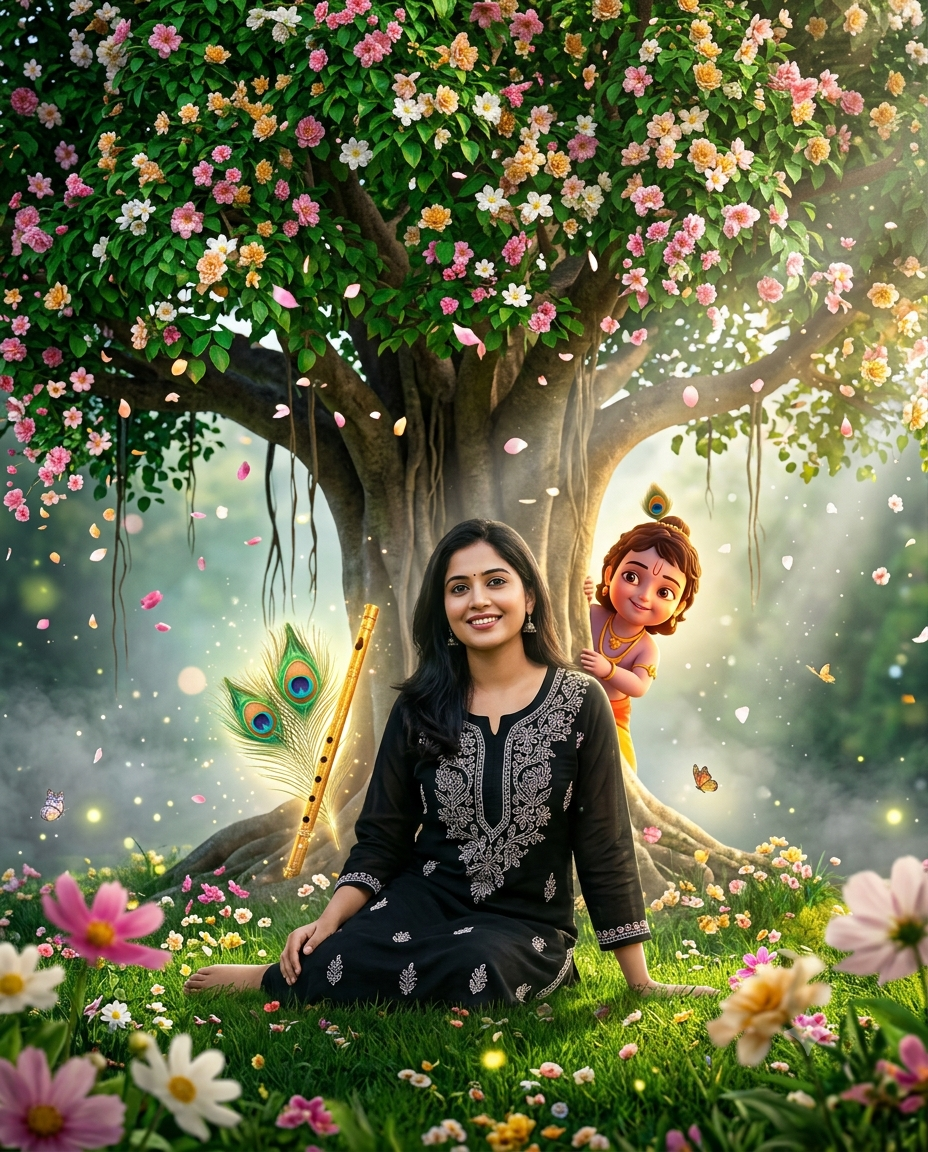
Krishna Hiding Tree Behind Ai Photo Editing Prompt  - AI Generated Image
AI Prompt Used

Here's a much more cinematic, professional, AI image-generation prompt with a luxury 4K look. I've also corrected it so it matches the uploaded image (woman instead of "boy/young man") while preserving the identity. --- Ultra-Realistic 8K Cinematic Prompt STRICT IDENTITY LOCK: Preserve the SAME person's face with 101% identity accuracy. Do not change or beautify the face in any way. Keep the exact facial structure, eyes, eyebrows, nose, lips, jawline, smile, skin tone, hairstyle, hairline, expression, and body proportions identical to the reference image. Keep the same black embroidered outfit exactly as in the original image. Scene: Create an ultra-realistic cinematic fantasy portrait in a divine Vrindavan-inspired garden. A majestic ancient banyan tree with lush emerald-green leaves stands behind her. The branches are filled with thousands of blooming pink, white, and golden flowers, while delicate flower petals gently fall through the air. She is seated gracefully beneath the tree in an elegant, natural pose on vibrant green grass covered with scattered blossoms. Place Lord Krishna's golden flute and a pair of radiant peacock feathers beside the tree roots, glowing softly with divine light. Behind the tree, add an adorable Little Krishna (3D Jubilee-style) peeking playfully from behind the trunk, smiling warmly as if watching her. Little Krishna should appear magical, realistic, and beautifully integrated into the environment with subtle golden rim lighting. The environment features dreamy god rays passing through the leaves, cinematic volumetric lighting, floating dust particles, soft mist, sparkling bokeh, butterflies, fireflies, and an ethereal golden-hour atmosphere. Add depth with realistic foreground flowers and blurred floral elements for a premium DSLR look. Camera & Composition: Ultra-wide cinematic composition Dynamic low-angle + slight upper-angle perspective 35mm full-frame lens f/1.8 aperture Shallow depth of field Natural perspective Perfect facial focus HDR photography Soft cinematic bloom Ultra-detailed skin texture Realistic fabric folds Hyper-realistic lighting Premium color grading Hollywood fantasy aesthetic Quality: Masterpiece, Best Quality, Ultra HD, 8K, Photorealistic, Hyper Realistic, Unreal Engine 5, Octane Render, Ray Tracing, Global Illumination, Volumetric Lighting, HDR, Cinematic Color Grading, Sharp Details, Instagram Viral Aesthetic, Luxury Fantasy Portrait, Award-Winning Photography, DSLR Quality, Maximum Detail. Aspect Ratio: 4:5 (Instagram Portrait).
Advertisement

Discover Superior Results With The Help Following Ai Option

Midjourney has solidified its position as the premier AI art platform for creators seeking to transform imaginative concepts into stunning visual masterpieces. Whether you want professional-grade photography, realistic portraits, or cinematic scenes, Midjourney's innovative prompts enable you to control lighting, composition, camera settings, and mood with AI-powered precision. This curated collection of prompts is tailored for photographers, content creators, and visual storytellers who want more than just basic AI generation; it's for those eager to enhance photographic skills, create professional portfolios, and produce stunning visual content using Midjourney's advanced capabilities. Every prompt incorporates current visual trends including krishna, hiding, tree, blending professional photography principles with AI-enhanced creativity. With Midjourney's advanced artistic engine, even simple concepts can become gallery-worthy artworks that showcase creativity, style, and technical excellence.

How To Edit Your Photo Using This Prompt

1
Access the Platform: Access the Midjourney platform through Discord or the web interface. Join a dedicated channel or use direct messaging with the Midjourney bot.
2
Prepare Your Input: Upload your photo on respective AI . Ensure you have specific lighting, composition, and style requirements in mind.
3
Use Your Prompt: Type "/imagine" followed by your chosen prompt. For example: "Here's a much more cinematic, professional, AI image-generation prompt with a luxury 4K look. I've a". Adjust parameters like --ar for aspect ratio or --style for different artistic approaches.
4
Customize Details: Define camera settings, lighting conditions, focal length, and photographic style. Mention specific techniques or equipment if relevant.
5
Generate and Refine: Click generate and wait for the initial results. Use the U buttons to upscale specific variations or V buttons to create new variations based on your favorites.
6
Finalize and Export: Download your preferred result in your chosen resolution. Use Max Upscale for the highest quality output suitable for professional use.

Expert Tips for Best Results

  • Define Lighting Conditions: Specify 'golden hour', 'studio lighting', 'natural light', or 'dramatic shadows' for mood control.
  • Mention Camera Equipment: Reference specific cameras, lenses, or photographic equipment for authentic results.
  • Set the Scene: Describe backgrounds, environments, and atmospheric conditions in detail.
  • Control Depth of Field: Use terms like 'shallow depth of field', 'bokeh background', or 'everything in focus'.
  • Specify Photo Style: Mention 'portrait photography', 'landscape', 'street photography', or 'commercial shoot'.
  • Include Technical Details: Reference ISO, aperture, shutter speed, or film types for realistic rendering.
  • Consider Post-Processing: Mention desired editing styles like 'vintage filter', 'high contrast', or 'natural colors'.

Recommended AI Tools

ChatGPT

Superior at understanding photographic terms and realistic rendering

Google Gemini

Strong research capabilities and factual accuracy

Stable Diffusion

Best for photorealistic outputs with custom models

Midjourney

Excellent for artistic photography styles and compositions

Usage Tips

  • Specify camera types and lenses for different photographic effects
  • Use lighting terms like 'golden hour' or 'studio lighting'
  • Experiment with different film types and processing styles
  • Add compositional rules like 'rule of thirds' explicitly
  • Include depth of field requirements for focus control

Optimization Tips

  • Use specific, descriptive language in your prompts for better AI understanding
  • Include relevant keywords like 'krishna', 'hiding' for targeted results
  • Experiment with different parameter combinations to optimize outputs
  • Save successful prompt variations for future reference and refinement
  • Stay updated with the latest AI model capabilities and limitations
Advertisement

You Might Like:

Quick Unique Best Match
Loading ai editing prompt...