CSK Prompt Gemini Ai Photo Editing Prompt

Advertisement
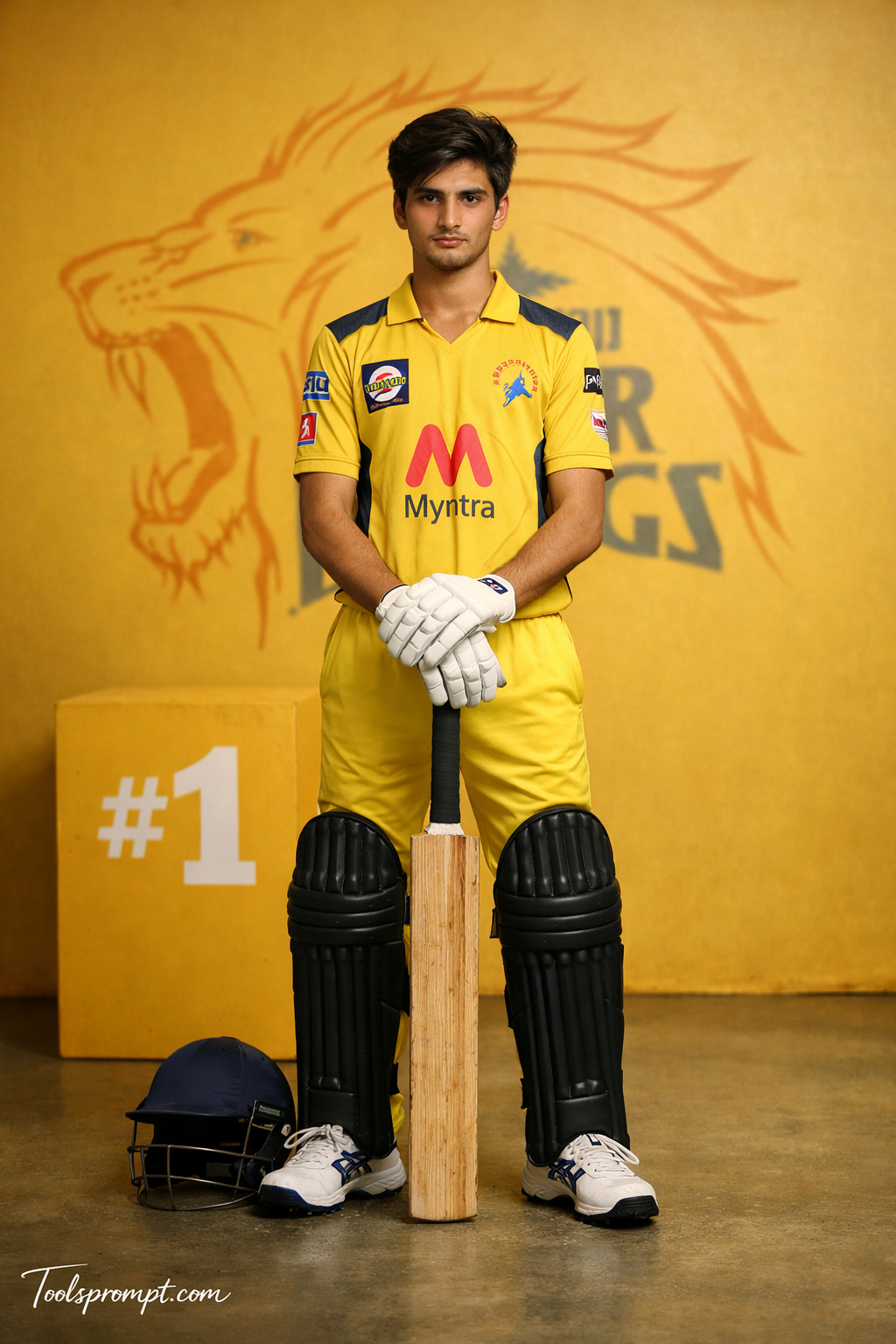
CSK Prompt Gemini Ai Photo Editing Prompt  - AI Generated Image
AI Prompt Used

Create an ultra-realistic cinematic DSLR photograph recreating the SAME CSK cricket-themed scene with full-body visibility including shoes, maintaining exact realism and ZERO AI or edited appearance. The subject is an 18-year-old handsome young man with a slim, lean physique, narrow shoulders and waist. His face remains EXACTLY identicalβ€”no modification in facial structure, pores, skin texture, beard, or identity. Hairstyle is strictly consistent: modern textured side-swept quiff with natural volume, messy controlled strands, matte finish, softly blended sides (NO fade). FRAMING & CAMERA: Full-body shot (head to shoes fully visible), vertical composition using a 50mm cinematic lens, eye-level angle for balanced professional framing. ASPECT RATIO β€’ 3:4 vertical POSE (NEW – STANDING BAT GUARD POSE): Standing upright with legs slightly apart. Bat held vertically in front of body, both hands resting on handle. Helmet placed on ground beside one foot. Body straight with squared shoulders and grounded stance. EXPRESSION: Serious focused expression with calm confidence, eyes looking directly toward camera. OUTFIT (CSK THEME): β€” Yellow CSK jersey with realistic fabric texture and details β€” Matching trousers extending to ankles with natural folds β€” White batting gloves β€” Dark cricket pads fully visible β€” Cricket shoes clearly visible with sole grip and texture PROPS: β€” Bat grounded in front with visible wood grain β€” Helmet placed naturally beside foot β€” Full cricket gear visible BOX (NO GLOW): β€” Matte yellow box placed behind subject β€” Clean white β€œ#1” printed β€” Natural shadow beneath BACKGROUND: β€” Bright yellow cinematic background β€” Large CSK lion logo behind subject (centered, slightly blurred) β€” No extra text LIGHTING: β€” Soft key light illuminating entire body β€” Subtle top light for depth β€” Rim light separating subject from background β€” Balanced cinematic shadows COLOR GRADING: Warm yellow tone with high contrast and natural skin preservation. DEPTH OF FIELD: Subject fully sharp from head to shoes, background slightly blurred. FACE CLARITY β€” ULTRA HD MICRO DETAIL Face must be ultra-HD, razor sharp with visible pores and exact identity match. STYLE Professional cricket poster, ultra-realistic DSLR photography. IMPORTANT HARD RULE Must look like real photograph. NO AI artifacts. NEGATIVE PROMPT face change, blur face, CGI, cartoon, extra limbs, bad anatomy, low resolution TEXT / SIGNATURE Add β€œToolsprompt.com” at the bottom-left corner, HANDWRITTEN SIGNATURE-STYLE typography, thin cursive strokes, small size, subtle premium elegance, white or soft off-white color.
Advertisement

Discover Superior Results With The Help Following Ai Option

Leonardo AI has become the favorite among professional artists and designers for its studio-quality outputs and advanced features. Whether you want professional-grade photography, realistic portraits, or cinematic scenes, Leonardo AI's innovative prompts enable you to control lighting, composition, camera settings, and mood with AI-powered precision. This curated collection of prompts is tailored for photographers, content creators, and visual storytellers who want more than just basic AI generation; it's for those eager to enhance photographic skills, create professional portfolios, and produce stunning visual content using Leonardo AI's advanced capabilities. Every prompt incorporates current visual trends including csk, prompt, gemini, blending professional photography principles with AI-enhanced creativity. Using Leonardo AI's professional-grade tools, standard concepts can become studio-quality productions that exhibit commercial-ready polish and artistic integrity.

How To Edit Your Photo Using This Prompt

1
Access the Platform: Access Leonardo AI through their web platform or integrated design tools designed for professional creative workflows.
2
Prepare Your Input: Upload your photo on respective AI . Ensure you have specific lighting, composition, and style requirements in mind.
3
Use Your Prompt: Input your prompt in the generation panel. Use: "Create an ultra-realistic cinematic DSLR photograph recreating the SAME CSK cricket-themed scene wit". Select appropriate models and adjust generation parameters as needed.
4
Customize Details: Define camera settings, lighting conditions, focal length, and photographic style. Mention specific techniques or equipment if relevant.
5
Generate and Refine: Launch the generation and track progress. Use the platform's advanced tools to make real-time adjustments and refinements.
6
Finalize and Export: Export your final creation in professional formats. The platform offers commercial-grade outputs ready for various applications.

Expert Tips for Best Results

  • Define Lighting Conditions: Specify 'golden hour', 'studio lighting', 'natural light', or 'dramatic shadows' for mood control.
  • Mention Camera Equipment: Reference specific cameras, lenses, or photographic equipment for authentic results.
  • Set the Scene: Describe backgrounds, environments, and atmospheric conditions in detail.
  • Control Depth of Field: Use terms like 'shallow depth of field', 'bokeh background', or 'everything in focus'.
  • Specify Photo Style: Mention 'portrait photography', 'landscape', 'street photography', or 'commercial shoot'.
  • Include Technical Details: Reference ISO, aperture, shutter speed, or film types for realistic rendering.
  • Consider Post-Processing: Mention desired editing styles like 'vintage filter', 'high contrast', or 'natural colors'.

Recommended AI Tools

ChatGPT

Superior at understanding photographic terms and realistic rendering

Google Gemini

Strong research capabilities and factual accuracy

Stable Diffusion

Best for photorealistic outputs with custom models

Midjourney

Excellent for artistic photography styles and compositions

Usage Tips

  • Specify camera types and lenses for different photographic effects
  • Use lighting terms like 'golden hour' or 'studio lighting'
  • Experiment with different film types and processing styles
  • Add compositional rules like 'rule of thirds' explicitly
  • Include depth of field requirements for focus control

Optimization Tips

  • Use specific, descriptive language in your prompts for better AI understanding
  • Include relevant keywords like 'csk', 'prompt' for targeted results
  • Experiment with different parameter combinations to optimize outputs
  • Save successful prompt variations for future reference and refinement
  • Stay updated with the latest AI model capabilities and limitations
Advertisement

You Might Like:

Quick Unique Best Match
Loading ai editing prompt...