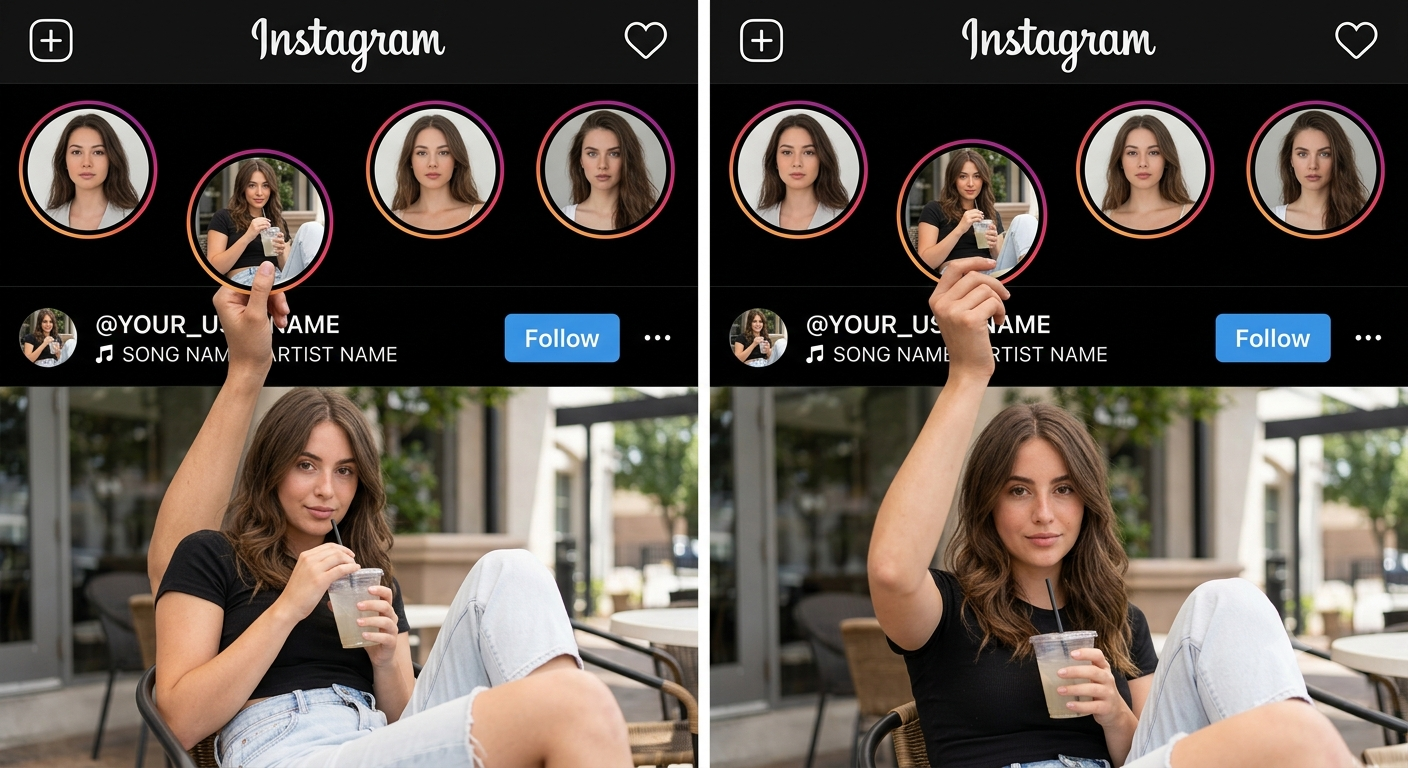
AI Prompt Used
Create a highly realistic Instagram profile + Instagram post composition using the uploaded reference image as the EXACT composition and positioning reference.
IMPORTANT: Study the uploaded reference image carefully before generating. Do NOT redesign the layout. Do NOT move the special Story circle too far downward. Do NOT place the entire person over the Instagram interface. The final composition must closely match the physical arrangement of the uploaded reference.
━━━━━━━━━━━━━━━━━━━━
1. INSTAGRAM HEADER
━━━━━━━━━━━━━━━━━━━━
Create a realistic Instagram dark-mode interface at the top.
Include:
- Instagram wordmark at top center
- Plus icon at top left
- Heart/notification icon at top right
- Black/dark background
- Authentic Instagram-style typography
- Realistic spacing and proportions
━━━━━━━━━━━━━━━━━━━━
2. STORY ROW
━━━━━━━━━━━━━━━━━━━━
Create FOUR circular Instagram Story thumbnails.
Three Story circles must remain in one normal horizontal row.
The special Story circle is the SECOND Story circle.
IMPORTANT: The second Story circle should NOT be moved far downward. Move it ONLY slightly downward compared with the other Story circles, exactly like the uploaded reference. Its position should still remain within the upper Instagram UI area. The bottom of this special Story circle should reach approximately the USERNAME + MUSIC/SONG ROW. It should NOT extend deep into the main photograph. It should NOT reach far down into the person's body. The special Story circle should overlap the username/music area slightly, matching the reference.
━━━━━━━━━━━━━━━━━━━━
3. SPECIAL STORY CIRCLE
━━━━━━━━━━━━━━━━━━━━
Inside the special Story circle, show the SAME MALE PERSON from the uploaded reference photo. He is sitting casually and holding a transparent cold drink with a straw.
Preserve his identity:
- same face
- same facial structure
- same skin tone
- same hairstyle
- same recognizable features
Do not create a different person.
The Story circle should look like a normal Instagram Story thumbnail that has been slightly pulled downward.
━━━━━━━━━━━━━━━━━━━━
4. HAND + STORY INTERACTION — MOST IMPORTANT
━━━━━━━━━━━━━━━━━━━━
The main male person is in the LARGE PHOTO BELOW the Instagram interface.
His BODY MUST REMAIN INSIDE THE MAIN PHOTOGRAPH.
Do NOT place his whole body inside the black Instagram UI.
Do NOT make the person stand over the Instagram interface.
Only ONE ARM should extend upward from the main photograph into the black Instagram UI.
The forearm travels upward naturally from the main photograph.
The hand reaches the bottom of the slightly lowered Story circle.
The hand must ACTUALLY HOLD the bottom edge of the Story circle.
The fingers should visibly touch/grip the lower part of the circular Story frame.
The hand should be positioned around the USERNAME + MUSIC/SONG ROW area, exactly like the uploaded reference.
The hand should NOT be far below the Story circle.
The hand should NOT simply point toward the Story.
The hand should NOT float.
The fingers should naturally overlap the lower edge of the Story circle.
The physical interaction should look like the person is holding the Story circle from underneath.
IMPORTANT POSITIONING:
Story circle
↓
slightly lowered
↓
username + music row
↓
hand/fingers around this same area
↓
main photograph begins
↓
person's body remains INSIDE the photograph
Do NOT push the Story circle into the main photograph.
Do NOT push the person into the Instagram UI.
━━━━━━━━━━━━━━━━━━━━
5. USERNAME + MUSIC ROW
━━━━━━━━━━━━━━━━━━━━
This is an IMPORTANT part of the reference.
Show the Instagram username and music information in the BLACK UI AREA directly around the hand.
Username: @YOUR_USERNAME
Music: 🎵 SONG NAME • ARTIST NAME
The username and song row must look like a real Instagram interface.
The username should be visible naturally near the hand, just like the reference.
The hand may overlap/appear around this area naturally, but do NOT completely cover the username or song.
Keep enough of the username and music text visible to clearly read it.
The username must be customizable.
Do NOT generate a random username.
━━━━━━━━━━━━━━━━━━━━
6. FOLLOW BUTTON
━━━━━━━━━━━━━━━━━━━━
Place a realistic Instagram-style Follow button on the right side of the username/music area.
Also include a realistic three-dot menu icon.
Keep their position similar to the uploaded reference.
━━━━━━━━━━━━━━━━━━━━
7. MAIN INSTAGRAM POST / PHOTO
━━━━━━━━━━━━━━━━━━━━
Below the black Instagram UI area, create the MAIN PHOTOGRAPH.
The main photograph should begin at approximately the same position as the uploaded reference.
The MALE PERSON must be completely inside this photograph.
His torso, head and body must remain below the Instagram UI boundary.
Only his raised arm/forearm/hand extends upward into the black Instagram interface.
This distinction is VERY IMPORTANT.
Do NOT place his head or body over the Instagram Story section.
Do NOT make him appear to be standing behind the Instagram interface.
The photograph should look like an actual Instagram post/photo.
Use a realistic outdoor environment with natural lighting.
━━━━━━━━━━━━━━━━━━━━
8. MAIN PERSON
━━━━━━━━━━━━━━━━━━━━
Use the SAME MALE PERSON from the uploaded reference.
Preserve identity exactly:
- facial features
- face shape
- skin tone
- hairstyle
- body proportions
- recognizable appearance
Do not face-swap.
Do not beautify excessively.
Do not change his identity.
His pose should naturally match the reference:
- body inside the photo
- one arm raised upward
- hand reaching into the Instagram UI
- hand holding the lowered Story circle
- other arm/body naturally positioned
━━━━━━━━━━━━━━━━━━━━
9. OTHER STORY IMAGES
━━━━━━━━━━━━━━━━━━━━
The other Story circles should contain completely different randomly generated AI images.
Story 1: A random realistic or aesthetic profile image.
Story 3: A random anime/illustration-style image.
Story 4: Another random realistic or anime-style image.
Do NOT use the main person's face in the random Story images.
They should look like different Instagram users.
━━━━━━━━━━━━━━━━━━━━
10. EXACT POSITIONING — CRITICAL
━━━━━━━━━━━━━━━━━━━━
Match the uploaded reference image's proportions and positioning.
DO NOT:
- move the special Story circle far downward
- put the Story circle in the middle of the main photograph
- put the person's body over the Instagram UI
- put the person's head above the photo boundary
- make the person stand on top of the Instagram interface
- make the person simply point at the Story
- leave a gap between the hand and Story circle
DO:
- keep three Stories in the normal row
- lower ONLY the special Story circle slightly
- keep that Story circle around the username/music row
- keep username and music visible
- place the hand around the username/music row
- extend only the forearm and hand into the UI
- keep the entire person inside the main photograph
- make the hand physically hold the bottom of the Story circle
- keep the main photograph below the Instagram UI
- reproduce the same visual illusion as the uploaded reference
━━━━━━━━━━━━━━━━━━━━
11. REALISM
━━━━━━━━━━━━━━━━━━━━
Ultra photorealistic.
Professional DSLR photography.
Natural skin texture.
Realistic hands.
Correct fingers.
Correct anatomy.
Natural perspective.
Realistic contact between fingers and Story frame.
Realistic shadows.
Natural lighting.
High detail.
Authentic Instagram interface.
No plastic skin.
No distorted hands.
No extra fingers.
No extra arms.
No extra limbs.
No duplicate person.
No floating hand.
No floating Story circle.
No unnatural body position.
FINAL VISUAL GOAL:
The finished image must look almost like the uploaded reference composition:
A normal Instagram interface at the top,
three Stories in their normal row,
one Story circle slightly lowered,
the lowered Story circle sitting around the username/music area,
the main person's hand coming upward from the photograph and physically holding that Story circle,
while the MAIN PERSON'S BODY remains completely INSIDE THE LOWER INSTAGRAM POST/PHOTOGRAPH.
The person must NOT come out of the photograph.
Only the raised arm and hand enter the Instagram UI.
The special Story circle must NOT be excessively lowered.
Keep it close to the username + song row, exactly like the reference.
Discover Superior Results With The Help Following Ai Option