Viral Mahashivratri Ai Video Editing Prompt For Instagram Reels Create using Google Gemini

Advertisement
Viral Mahashivratri Ai Video Editing Prompt For Instagram Reels Create using Google Gemini  - AI Generated Image
AI Prompt Used

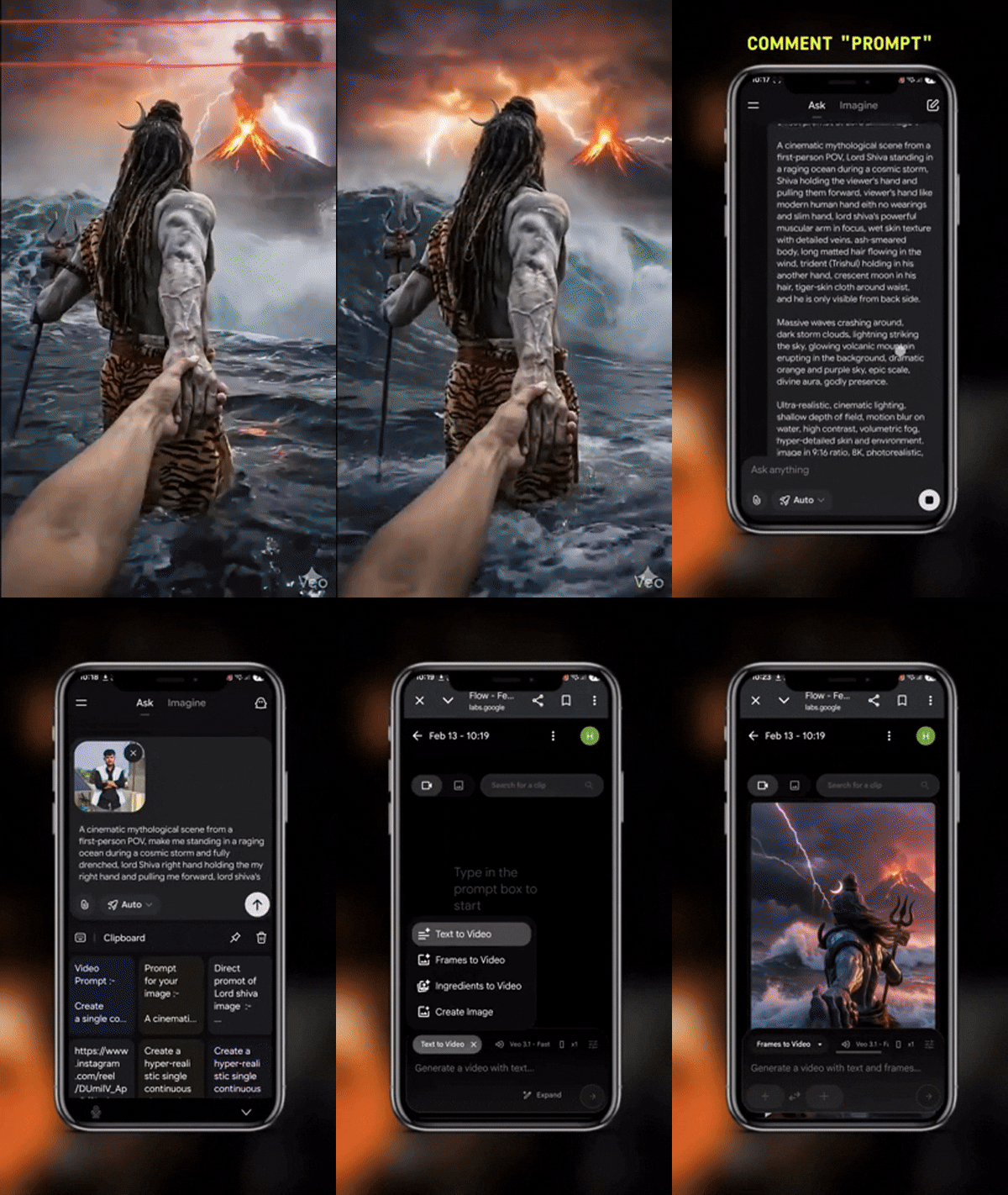
Prompt 1st: A cinematic mythological scene from a first-person POV, Lord Shiva standing in a raging ocean during a cosmic storm, Shiva holding the viewer's hand and pulling them forward, viewer's hand like modern human hand eith no wearings and slim hand, lord shiva's powerful muscular arm in focus, wet skin texture with detailed veins, ash-smeared body, long matted hair flowing in the wind, trident (Trishul) holding in his another hand, crescent moon in his hair, tiger-skin cloth around waist, and he is only visible from back side. Massive waves crashing around, dark storm clouds, lightning striking the sky, glowing volcanic mountain erupting in the background, dramatic orange and purple sky, epic scale, divine aura, godly presence. Ultra-realistic, cinematic lighting, shallow depth of field, motion blur on water, high contrast, volumetric fog, hyper-detailed skin and environment, image in 9:16 ratio, 8K, photorealistic, movie still, epic fantasy realism. Prompt 2nd: A cinematic mythological scene from a first-person POV, make me standing in a raging ocean during a cosmic storm and fully drenched, lord Shiva right hand holding the my right hand and pulling me forward, lord shiva's powerful muscular arm in focus, wet skin texture with detailed veins. Make only lord Shiva's hand visible in frame.Massive waves crashing around, dark storm clouds, lightning striking the sky, glowing volcanic mountain erupting in the background, dramatic orange and purple sky, epic scale, divine aura, godly presence.Ultra-realistic, cinematic lighting, shallow depth of field, motion blur on water, high contrast, volumetric fog and dark sky, hyper-detailed skin and environment, image in 9:16 ratio, 8K, photorealistic, movie still, epic fantasy realism. Prompt 3rd: Create a single continuous cinematic shot using the two uploaded images as the start and end reference. The video begins in a first-person POV. The camera shows only the front person's shoulder, arm, and hand holding the viewer's hand. The camera moves forward naturally, as if the viewer is walking through ocean waves. Water splashes, rain falls, lightning flashes, and a volcano erupts in the background. Without any cuts or scene changes, the camera smoothly moves around the subject in one fluid motion, maintaining the hand-holding connection. The movement feels like a natural body-mounted camera (steady but realistic). As the camera completes the movement, it ends facing me, fully revealing my face and body while I continue walking forward through the water, still holding the viewer's hand. Technical Style: Single take, one-shot camera, no cuts, no jumps, smooth cinematic motion, realistic physics, slow motion water splashes, dramatic lighting, ultra-realistic textures, epic storm atmosphere, 4K cinematic quality, natural human movement, stable focus, no flicker.
Advertisement

Discover Superior Results With The Help Following Ai Option

Google Gemini AI has emerged as the go-to solution for transforming everyday content into visually striking digital masterpieces. Whether you want professional-grade photography, realistic portraits, or cinematic scenes, Google Gemini AI's innovative prompts enable you to control lighting, composition, camera settings, and mood with AI-powered precision. This curated collection of prompts is tailored for photographers, content creators, and visual storytellers who want more than just basic AI generation; it's for those eager to enhance photographic skills, create professional portfolios, and produce stunning visual content using Gemini AI's advanced capabilities. Every prompt incorporates current visual trends including viral, mahashivratri, video, blending professional photography principles with AI-enhanced creativity. With Gemini AI's powerful generation engine, straightforward inputs can become professional-quality outputs that reflect precision, style, and modern aesthetics.

How To Edit Your Photo Using This Prompt

1
Access the Platform: Access Google Gemini AI through the browser interface, mobile application, or integrated Google Workspace tools.
2
Prepare Your Input: Upload your photo on respective AI . Ensure you have specific lighting, composition, and style requirements in mind.
3
Use Your Prompt: Input your prompt directly into the generation interface. Try: "Prompt 1st: A cinematic mythological scene from a first-person POV, Lord Shiva standing in a ragin". Use descriptive language and be specific about your desired outcome.
4
Customize Details: Define camera settings, lighting conditions, focal length, and photographic style. Mention specific techniques or equipment if relevant.
5
Generate and Refine: Initiate generation and monitor the progress. The platform will provide multiple options that you can refine or regenerate as needed.
6
Finalize and Export: Choose the best result and export in your desired format and resolution. The platform provides options for different applications and platforms.

Expert Tips for Best Results

  • Define Lighting Conditions: Specify 'golden hour', 'studio lighting', 'natural light', or 'dramatic shadows' for mood control.
  • Mention Camera Equipment: Reference specific cameras, lenses, or photographic equipment for authentic results.
  • Set the Scene: Describe backgrounds, environments, and atmospheric conditions in detail.
  • Control Depth of Field: Use terms like 'shallow depth of field', 'bokeh background', or 'everything in focus'.
  • Specify Photo Style: Mention 'portrait photography', 'landscape', 'street photography', or 'commercial shoot'.
  • Include Technical Details: Reference ISO, aperture, shutter speed, or film types for realistic rendering.
  • Consider Post-Processing: Mention desired editing styles like 'vintage filter', 'high contrast', or 'natural colors'.

Recommended AI Tools

ChatGPT

Superior at understanding photographic terms and realistic rendering

Google Gemini

Strong research capabilities and factual accuracy

Stable Diffusion

Best for photorealistic outputs with custom models

Midjourney

Excellent for artistic photography styles and compositions

Usage Tips

  • Specify camera types and lenses for different photographic effects
  • Use lighting terms like 'golden hour' or 'studio lighting'
  • Experiment with different film types and processing styles
  • Add compositional rules like 'rule of thirds' explicitly
  • Include depth of field requirements for focus control

Optimization Tips

  • Use specific, descriptive language in your prompts for better AI understanding
  • Include relevant keywords like 'viral', 'mahashivratri' for targeted results
  • Experiment with different parameter combinations to optimize outputs
  • Save successful prompt variations for future reference and refinement
  • Stay updated with the latest AI model capabilities and limitations
Advertisement

You Might Like:

Quick Unique Best Match
Loading ai editing prompt...