Vector Ai Photo Editing Prompt to Create Beautiful Girl in Saree

Advertisement
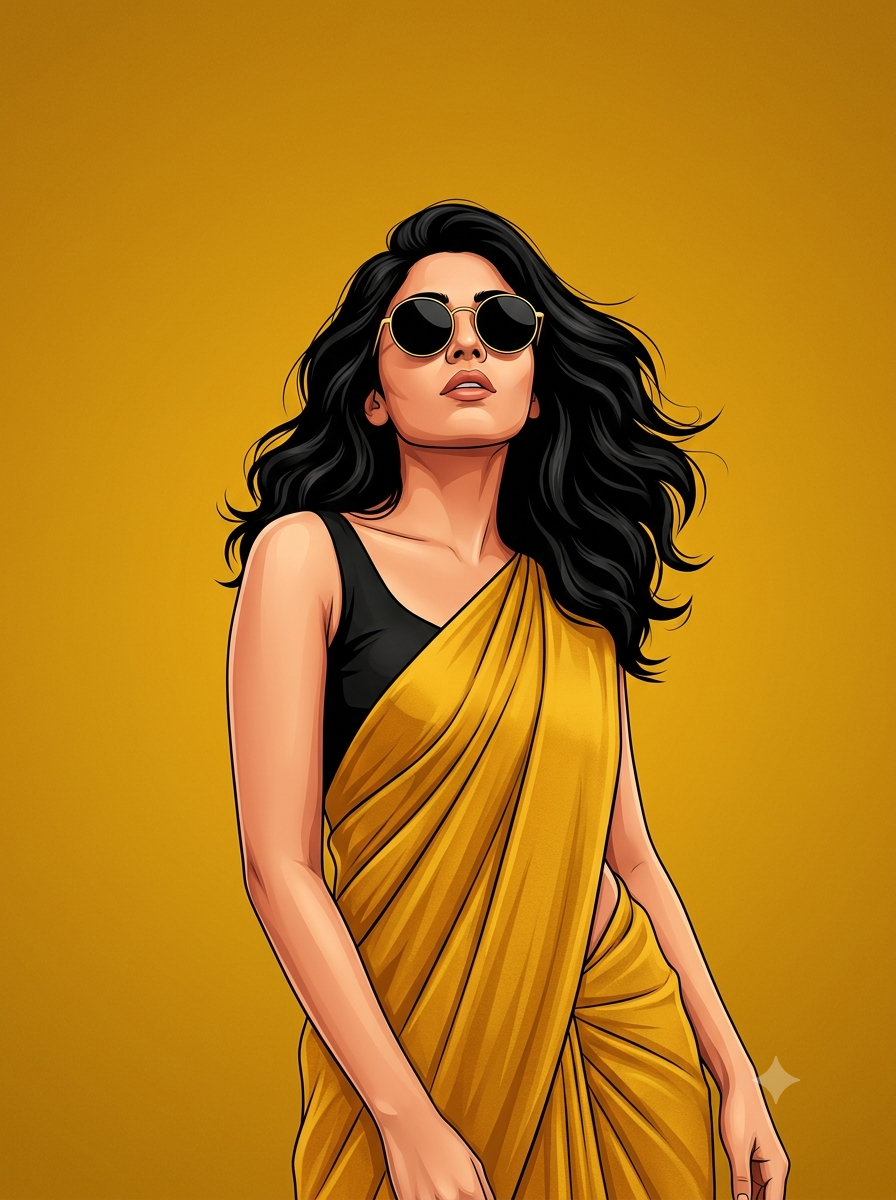
Vector Ai Photo Editing Prompt to Create Beautiful Girl in Saree - AI Generated Image
AI Prompt Used

Create a high-end digital illustration poster featuring the uploaded girl transformed into a confident, stylish fashion icon. Preserve her facial features and identity while rendering her in a clean, modern vector-painting style with smooth brushwork, bold outlines, rich shading, and premium editorial artwork quality. Pose her in a powerful and elegant stance: body slightly angled, shoulders relaxed, head tilted upward with a confident, fearless expression. Maintain a poised posture with arms naturally positioned near the body, creating a calm yet dominant presence.The overall attitude should convey independence, confidence, elegance, and self-assurance. Style her with voluminous shoulder-length wavy black hair, naturally flowing with realistic texture and movement. Add oversized round black sunglasses with thin metallic frames, reflecting subtle ambient light. Dress her in a vibrant mustard-yellow saree draped gracefully over a sleeveless black blouse. The saree should feature realistic folds, fabric texture, and elegant draping that enhances the fashion-forward look. Background: a solid rich mustard-yellow backdrop with a soft textured gradient and minimal artistic grain. Keep the background completely clean and uncluttered with no objects, patterns, logos, watermarks, borders, captions, quotes, typography, or text elements of any kind. Lighting should be soft and cinematic, creating warm highlights on the skin and realistic depth in the hair, clothing, and accessories. Use a modern fashion-poster composition with the subject positioned slightly toward the lower-right portion of the frame, leaving generous negative space around her for a premium minimalist aesthetic.Ultra-detailed digital painting, editorial fashion illustration, luxury magazine cover quality, crisp linework, smooth color transitions, realistic facial rendering, elegant color harmony, high contrast, professional artwork, sophisticated mood, 4K resolution, vertical 3:4 aspect ratio, sharp focus, premium contemporary poster design
Advertisement

Discover Superior Results With The Help Following Ai Option

Leonardo AI has become the favorite among professional artists and designers for its studio-quality outputs and advanced features. Whether you want stunning visual artwork, creative compositions, or unique artistic styles, Leonardo AI's innovative prompts enable you to control style, composition, color palette, and artistic elements with AI-powered precision. This curated collection of prompts is tailored for artists, designers, and creative professionals who want more than just basic AI generation; it's for those eager to experiment with artistic styles, build portfolios, and create unique visual content using Leonardo AI's advanced capabilities. Each prompt combines trending aesthetics like vector, photo, editing, from innovative artistic movements to classic techniques reimagined for the digital age. Using Leonardo AI's professional-grade tools, standard concepts can become studio-quality productions that exhibit commercial-ready polish and artistic integrity.

How To Edit Your Photo Using This Prompt

1
Access the Platform: Access Leonardo AI through their web platform or integrated design tools designed for professional creative workflows.
2
Prepare Your Input: Start with a clear concept or reference image. Consider the artistic style, composition, and mood you want to achieve.
3
Use Your Prompt: Input your prompt in the generation panel. Use: "Create a high-end digital illustration poster featuring the uploaded girl transformed into a confide". Select appropriate models and adjust generation parameters as needed.
4
Customize Details: Specify artistic style, color palette, composition rules, and mood. Include references to specific artists or art movements if desired.
5
Generate and Refine: Launch the generation and track progress. Use the platform's advanced tools to make real-time adjustments and refinements.
6
Finalize and Export: Export your final creation in professional formats. The platform offers commercial-grade outputs ready for various applications.

Expert Tips for Best Results

  • Be Specific About Style: Mention artistic movements, specific artists, or detailed style descriptions for consistent results.
  • Control Composition: Use terms like 'rule of thirds', 'leading lines', or 'symmetrical composition' for better layout control.
  • Specify Color Palette: Include specific color combinations, mood-based palettes, or seasonal color themes.
  • Iterate and Refine: Don't hesitate to generate multiple variations and build upon successful results.
  • Use Negative Prompts: Exclude elements you don't want to see in the final artwork.
  • Experiment with Parameters: Adjust style, chaos, and quality parameters to explore different creative directions.
  • Combine Techniques: Mix different artistic styles and techniques for unique hybrid creations.

Recommended AI Tools

Midjourney

Excellent for artistic and creative imagery with strong stylistic control

DALL-E 3

Great for conceptual art and understanding complex prompt requirements

Stable Diffusion

Ideal for custom models and local generation with extensive control

Adobe Firefly

Perfect for commercial use with ethical training data

Usage Tips

  • Experiment with different art styles and mediums mentioned in the prompt
  • Adjust the --ar parameter for different aspect ratios in Midjourney
  • Use style references for more consistent results
  • Try varying the chaos parameter for more creative variations
  • Combine with other artistic prompts for hybrid styles

Optimization Tips

  • Use specific, descriptive language in your prompts for better AI understanding
  • Include relevant keywords like 'vector', 'photo' for targeted results
  • Experiment with different parameter combinations to optimize outputs
  • Save successful prompt variations for future reference and refinement
  • Stay updated with the latest AI model capabilities and limitations
Advertisement

You Might Like:

Quick Unique Best Match
Loading ai editing prompt...