Prompt Seen Imagination Ai prompt

Advertisement
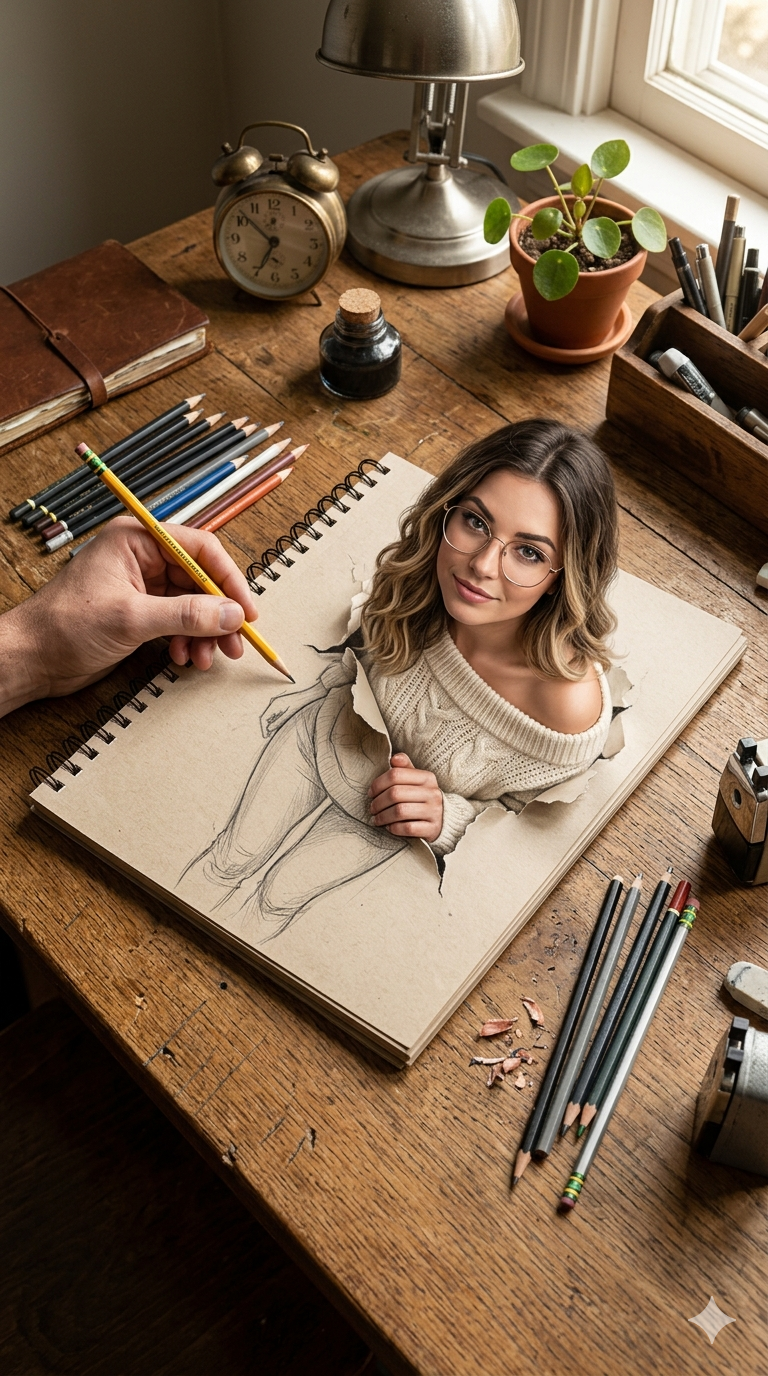
Prompt Seen Imagination Ai prompt - AI Generated Image
AI Prompt Used

Ultra-realistic 9:16 vertical masterpiece of a highly detailed artistic workspace, captured from a slightly angled top-down perspective. A richly textured rustic wooden desk fills the frame, every grain, scratch, and imperfection rendered in crisp sharp focus (no blur anywhere in the scene). At the center lies a spiral-bound sketchbook with slightly rough, natural paper texture. Emerging from the page is a breathtaking 3D illusion of a stunning European woman, where her upper body is fully photorealistic and appears to break through torn paper edges, while her lower body remains a finely detailed pencil sketch. The transition between sketch and reality is seamless and visually striking. The woman has distinct, unique facial features (different identity), with expressive eyes, natural lips, elegant bone structure, and flawless ultra-realistic skin with visible pores and soft natural shading. She wears modern thin-frame glasses and a cozy off-shoulder knitted sweater with intricate fabric texture. Her hairstyle is fashionable and modern (soft wavy hair with natural tones or subtle balayage), adding a contemporary European aesthetic. Her hands interact gently with the torn paper edges, enhancing the illusion. A highly detailed artist’s hand is visible, holding a sharpened yellow pencil mid-sketch, with realistic skin texture, veins, and natural grip. The pencil tip touches the boundary where sketch transitions into realism. The background is fully sharp and richly detailed (no depth blur), filled with carefully arranged artistic elements: scattered graphite pencils, colored pencils, sharpeners, eraser shavings, a metal sharpener, a vintage alarm clock, a leather-bound journal, a glass ink bottle, a small indoor plant in a textured pot, and a wooden organizer box. Every object is in clear focus, enhancing depth and realism. Lighting is warm, cinematic, and soft, coming from a combination of a visible desk lamp and ambient natural light, casting realistic shadows and highlights across the scene without any blur. Subtle reflections and highlights add depth and dimension. Style: hyperrealism, ultra-detailed, 8K resolution, sharp focus across entire frame, photorealistic textures, dramatic yet natural lighting, depth-rich composition, visually immersive, elegant and eye-catching. No watermark, no text.
Advertisement

Discover Superior Results With The Help Following Ai Option

Midjourney has solidified its position as the premier AI art platform for creators seeking to transform imaginative concepts into stunning visual masterpieces. Whether you want stunning visual artwork, creative compositions, or unique artistic styles, Midjourney's innovative prompts enable you to control style, composition, color palette, and artistic elements with AI-powered precision. This curated collection of prompts is tailored for artists, designers, and creative professionals who want more than just basic AI generation; it's for those eager to experiment with artistic styles, build portfolios, and create unique visual content using Midjourney's advanced capabilities. Each prompt combines trending aesthetics like prompt, seen, imagination, from innovative artistic movements to classic techniques reimagined for the digital age. With Midjourney's advanced artistic engine, even simple concepts can become gallery-worthy artworks that showcase creativity, style, and technical excellence.

How To Edit Your Photo Using This Prompt

1
Access the Platform: Access the Midjourney platform through Discord or the web interface. Join a dedicated channel or use direct messaging with the Midjourney bot.
2
Prepare Your Input: Start with a clear concept or reference image. Consider the artistic style, composition, and mood you want to achieve.
3
Use Your Prompt: Type "/imagine" followed by your chosen prompt. For example: "Ultra-realistic 9:16 vertical masterpiece of a highly detailed artistic workspace, captured from a s". Adjust parameters like --ar for aspect ratio or --style for different artistic approaches.
4
Customize Details: Specify artistic style, color palette, composition rules, and mood. Include references to specific artists or art movements if desired.
5
Generate and Refine: Click generate and wait for the initial results. Use the U buttons to upscale specific variations or V buttons to create new variations based on your favorites.
6
Finalize and Export: Download your preferred result in your chosen resolution. Use Max Upscale for the highest quality output suitable for professional use.

Expert Tips for Best Results

  • Be Specific About Style: Mention artistic movements, specific artists, or detailed style descriptions for consistent results.
  • Control Composition: Use terms like 'rule of thirds', 'leading lines', or 'symmetrical composition' for better layout control.
  • Specify Color Palette: Include specific color combinations, mood-based palettes, or seasonal color themes.
  • Iterate and Refine: Don't hesitate to generate multiple variations and build upon successful results.
  • Use Negative Prompts: Exclude elements you don't want to see in the final artwork.
  • Experiment with Parameters: Adjust style, chaos, and quality parameters to explore different creative directions.
  • Combine Techniques: Mix different artistic styles and techniques for unique hybrid creations.

Recommended AI Tools

Midjourney

Excellent for artistic and creative imagery with strong stylistic control

DALL-E 3

Great for conceptual art and understanding complex prompt requirements

Stable Diffusion

Ideal for custom models and local generation with extensive control

Adobe Firefly

Perfect for commercial use with ethical training data

Usage Tips

  • Experiment with different art styles and mediums mentioned in the prompt
  • Adjust the --ar parameter for different aspect ratios in Midjourney
  • Use style references for more consistent results
  • Try varying the chaos parameter for more creative variations
  • Combine with other artistic prompts for hybrid styles

Optimization Tips

  • Use specific, descriptive language in your prompts for better AI understanding
  • Include relevant keywords like 'prompt', 'seen' for targeted results
  • Experiment with different parameter combinations to optimize outputs
  • Save successful prompt variations for future reference and refinement
  • Stay updated with the latest AI model capabilities and limitations
Advertisement

You Might Like:

Quick Unique Best Match
Loading ai editing prompt...