Trending Radha Rani Ai Photo Editing Prompt For Chatgpt Lovers

Advertisement
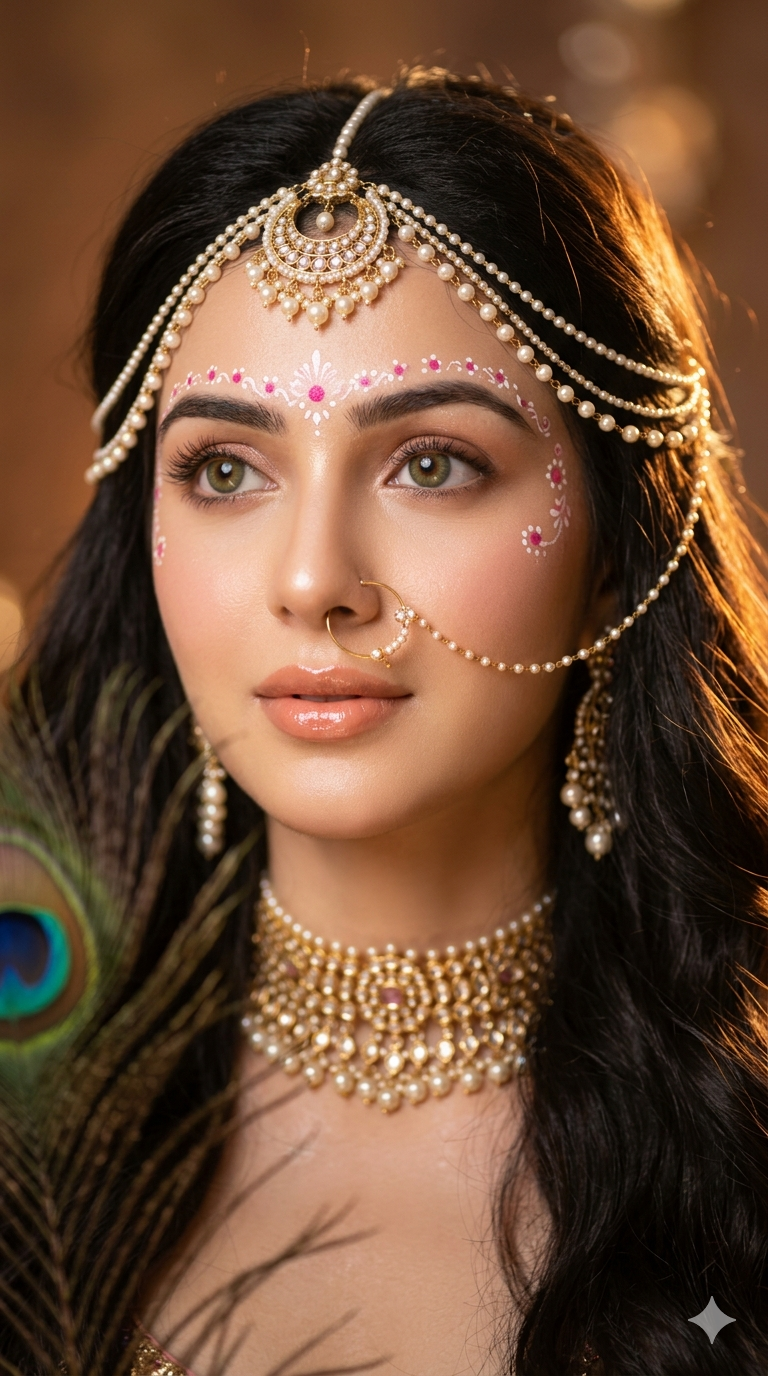
Trending Radha Rani Ai Photo Editing Prompt For Chatgpt Lovers - AI Generated Image
AI Prompt Used

Use my photo & create a portrait styled as a divine Radha-inspired muse, captured in warm golden sunset lighting with dreamy ethereal aesthetics. The composition is vertical 9:16 and tightly framed around my face and upper shoulders. Flawless soft fair skin with a luminous glow, large expressive hazel-green eyes looking slightly upward to the side, long curled lashes, defined brows, glossy peach nude lips slightly parted, and delicate facial features with a soft romantic expression. Long dark brown-black hair flows loosely in soft waves around my shoulders, with wispy strands crossing naturally over mg face in the foreground. I am adorned with elaborate traditional Indian jewelry: an ornate pearl-and-gold maang tikka crown draping across the hairline, dangling pearl chains framing both sides of the face, a delicate nose ring (nath) with tiny pearl detailing, layered pearl earrings, and a richly detailed gold choker necklace with Embedded pearls and gemstones. The jewelry should appear luxurious, intricate, and highly reflective under warm light. My makeup is soft-glam with shimmering champagne eyeshadow, glossy highlighted skin, subtle blush, and glowing highlighter. Tiny white and pink decorative dots and sacred artistic face paint are painted across the forehead, around the eyebrows, and upper cheeks in a delicate symmetrical pattern inspired by traditional devotional art. A peacock feather appears partially in the foreground on the left side of the frame, softly blurred yet recognizable, adding a Krishna-inspired spiritual aesthetic.Warm sunlight streams dramatically across mh face from the right side, creating golden highlights and soft shadows with cinematic depth. The lighting should feel magical, heavenly, and radiant, with glowing reflections on the jewelry and skin.Background is softly blurred in warm amber-brown tones with dreamy bokeh and shallow depth of field. Overall mood is divine, mystical, romantic, regal, and emotionally captivating. Hyper-realistic skin texture, glossy lips, ultra-detailed jewelry, cinematic color grading, volumetric warm light, editorial fashion photography.
Advertisement

Discover Superior Results With The Help Following Ai Option

ChatGPT has become the industry standard for prompt understanding and realistic image generation with exceptional attention to detail. Whether you want professional-grade photography, realistic portraits, or cinematic scenes, ChatGPT's innovative prompts enable you to control lighting, composition, camera settings, and mood with AI-powered precision. This curated collection of prompts is tailored for photographers, content creators, and visual storytellers who want more than just basic AI generation; it's for those eager to enhance photographic skills, create professional portfolios, and produce stunning visual content using DALL-E 3's advanced capabilities. Every prompt incorporates current visual trends including trending, radha, rani, blending professional photography principles with AI-enhanced creativity. Using DALL-E 3's sophisticated understanding capabilities, basic descriptions transform into photorealistic images that demonstrate exceptional detail and coherence.

How To Edit Your Photo Using This Prompt

1
Access the Platform: Open ChatGPT with DALL-E integration or access DALL-E directly through the OpenAI platform. Use the web interface or mobile application.
2
Prepare Your Input: Upload your photo on respective AI . Ensure you have specific lighting, composition, and style requirements in mind.
3
Use Your Prompt: Enter your prompt in the generation field. Use: "Use my photo & create a portrait styled as a divine Radha-inspired muse, captured in warm golden sun". Specify style, quality, and any specific requirements in natural language.
4
Customize Details: Define camera settings, lighting conditions, focal length, and photographic style. Mention specific techniques or equipment if relevant.
5
Generate and Refine: Click the generate button and review the created images. You can request variations or make specific edits to the generated content.
6
Finalize and Export: Select your preferred output and download in high resolution. The platform offers different quality settings for various use cases.

Expert Tips for Best Results

  • Define Lighting Conditions: Specify 'golden hour', 'studio lighting', 'natural light', or 'dramatic shadows' for mood control.
  • Mention Camera Equipment: Reference specific cameras, lenses, or photographic equipment for authentic results.
  • Set the Scene: Describe backgrounds, environments, and atmospheric conditions in detail.
  • Control Depth of Field: Use terms like 'shallow depth of field', 'bokeh background', or 'everything in focus'.
  • Specify Photo Style: Mention 'portrait photography', 'landscape', 'street photography', or 'commercial shoot'.
  • Include Technical Details: Reference ISO, aperture, shutter speed, or film types for realistic rendering.
  • Consider Post-Processing: Mention desired editing styles like 'vintage filter', 'high contrast', or 'natural colors'.

Recommended AI Tools

ChatGPT

Superior at understanding photographic terms and realistic rendering

Google Gemini

Strong research capabilities and factual accuracy

Stable Diffusion

Best for photorealistic outputs with custom models

Midjourney

Excellent for artistic photography styles and compositions

Usage Tips

  • Specify camera types and lenses for different photographic effects
  • Use lighting terms like 'golden hour' or 'studio lighting'
  • Experiment with different film types and processing styles
  • Add compositional rules like 'rule of thirds' explicitly
  • Include depth of field requirements for focus control

Optimization Tips

  • Use specific, descriptive language in your prompts for better AI understanding
  • Include relevant keywords like 'trending', 'radha' for targeted results
  • Experiment with different parameter combinations to optimize outputs
  • Save successful prompt variations for future reference and refinement
  • Stay updated with the latest AI model capabilities and limitations
Advertisement

You Might Like:

Quick Unique Best Match
Loading ai editing prompt...